SEO issue
Canonical Tag Issues: What They Mean and How to Fix Them
Updated September 2026
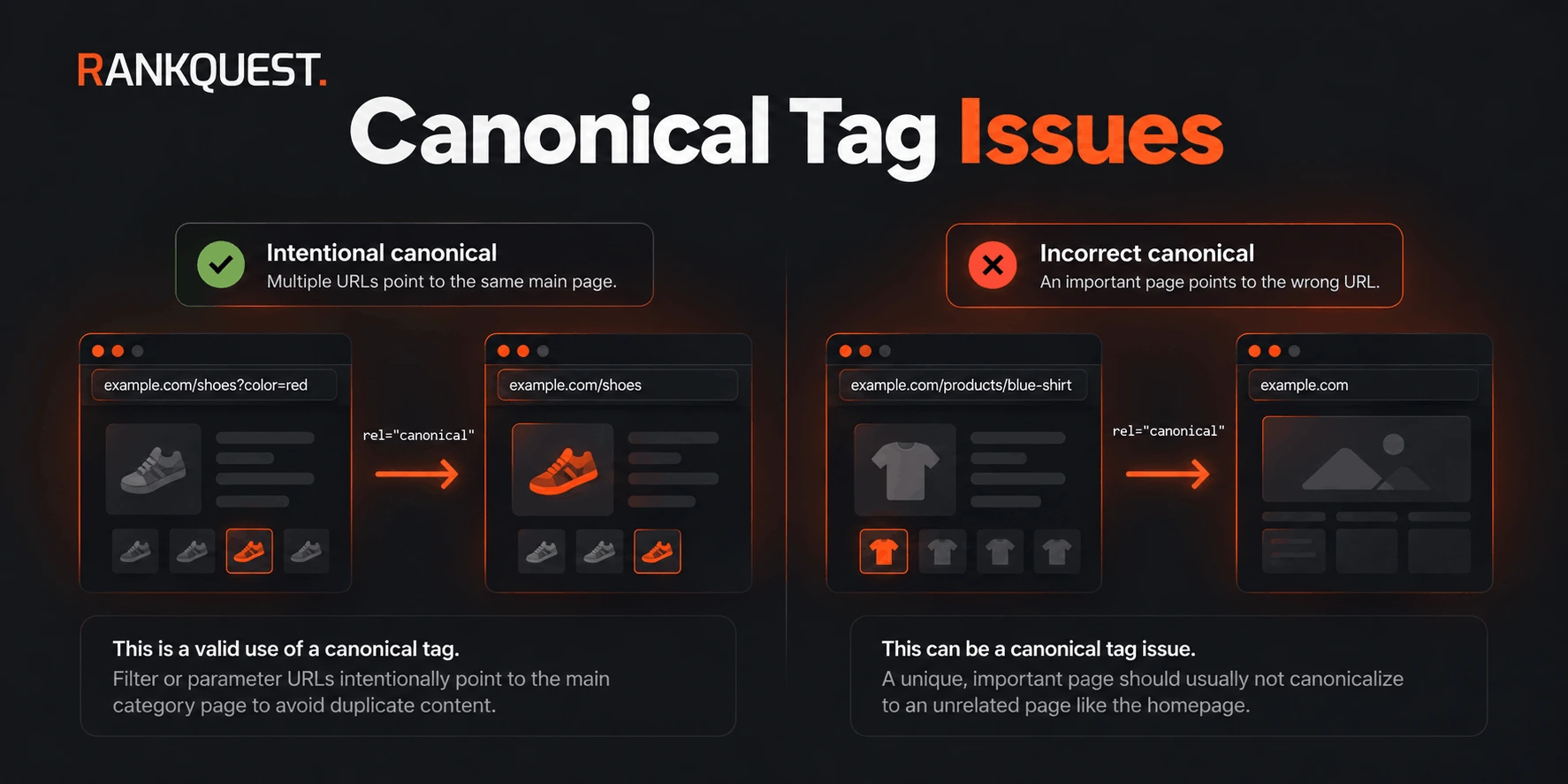 Intentional vs Incorrect Canonical Tags
A canonical tag is a hint in the page HTML that names the URL you would rather have indexed. A canonical tag issue is when that hint conflicts with the page you actually want in search.
A tag that points at a different URL is not automatically wrong. Filtered, duplicate, and parameter URLs are often supposed to consolidate to one preferred address. The problem is a preferred URL that does not match the indexing intent for that page.
What is a canonical tag?
The tag looks like this in the document head:
<link rel="canonical" href="https://example.com/preferred-url" />
It says: if several URLs expose the same or nearly the same content, treat this href as the preferred one. Search engines use it as a strong signal, alongside redirects, internal links, and sitemaps. They do not have to obey it. A canonical cannot force a blocked, noindexed, or irrelevant URL to rank, and a wrong canonical does not guarantee Google will drop the page you care about. It can still send the wrong preference, and that preference is often followed.
The preferred URL should be the one you want indexed: a single, working, indexable address for that content.
What is a canonical tag issue?
A canonical tag issue is a mismatch between the declared preferred URL and the URL that should represent the page.
Common forms:
- The tag is missing on a page that should declare its own URL, so crawlers are left to choose among duplicates.
- The href is empty, relative in a way that resolves to the wrong place, or not a valid URL.
- The tag points at a URL that redirects, 404s, or is a different page from the one in the browser.
- An important, unique page points at another unique page, or at the homepage, so its own URL is not the preferred one.
- A template applies one canonical to many pages that are not duplicates of each other.
A self-referencing canonical, where the href is the page's own URL, is normal for a page that should be indexed as itself. It is not a rule that every URL on the site must self-canonical. Some URLs exist so they can point elsewhere.
What canonical problems look like
A product template prints the canonical of the first product on every product page. Each URL is unique, and each tag names the wrong product.
A category page at /guides/technical-seo canonicalizes to /. Nothing about that page is a duplicate of the homepage. The tag was copied from a layout default.
After a redesign, pages still emit http:// or the non-www host, and that host redirects to the live URL. The canonical names a URL that does not stay put.
A parameterized duplicate such as /pricing?utm_source=newsletter is fine when it canonicalizes to /pricing. The same pattern is not fine when /pricing itself canonicalizes to /about.
Two locales or two URL shapes for one document, /docs/install and /docs/install/, each claim to be canonical. Crawlers are given two preferred URLs for one page.
The useful record is the page you crawled, the canonical href it declared, and the URL you believe should be preferred. A report that only says "canonical mismatch" has not made that comparison.
Why canonical tag issues matter
When the hint is respected, signals for duplicate URLs can consolidate on the preferred one. That is the point of the tag. When the hint names the wrong URL, the page you meant to rank may be treated as a copy of something else. Internal links and the sitemap can still point at the URL you care about, while the canonical argues for a different one. Those signals compete.
A missing canonical on a single clean URL is often a small gap. Search engines can still index that URL. It matters more when many URLs expose the same content and none of them names a preferred version, or when the tag that does exist names the wrong version.
One incorrect tag on an old campaign URL will not collapse the site. A template that stamps the wrong canonical onto every new page repeats the mistake on every publish.
When a different canonical is NOT actually a problem
Canonicalizing to another URL is a normal way to handle duplicates. Leave it alone when the source URL should not have its own place in the index and the target is the real page.
Filter and facet URLs are the usual case. /shop?color=blue or /shop?filter=size can canonicalize to /shop when those filtered views are not meant to rank on their own. A crawler that expected a self-canonical will call this a mismatch. The site may be doing the right thing. How to prioritize SEO issues after an audit walks through that exact false positive.
These are the same idea:
- Tracking parameters (
utm_source, session ids) on an otherwise identical URL, consolidating to the clean URL. - Alternate forms of one document, such as a trailing-slash variant or a print view, consolidating to the preferred form.
- A duplicate path created by a sort order or an internal search result, consolidating to the category or the result-free URL.
- An old parameter URL that still resolves, with the canonical already pointing at the replacement page.
The test is indexing intent. Ask what should be the indexed URL for this content. If the canonical names that URL, and that URL returns the right page, the difference is the fix, not the bug.
It is a problem when a distinct page is folded into the wrong target: a product canonicalizing to a different product, a guide canonicalizing to the homepage, or a template using one category URL for every article. It is also a problem when the target redirects, 404s, or is on a host you do not want indexed.
Do not "correct" an intentional canonical back to a self-reference just to clear an audit warning. That can ask search engines to index the filtered and parameter URLs you were trying to consolidate.
How to find canonical tag issues
View the page source, or the rendered head if the tag is injected by JavaScript, and read rel="canonical". Compare three things: the URL in the address bar, the href of the tag, and the URL you want indexed.
Crawl the site if there are more pages than you can open. For each indexable HTML URL, record the declared canonical and whether that target is the page itself, a deliberate duplicate target, or something else. Group rows that share the same mistake. A hundred products with the same wrong pattern are one template, not a hundred unrelated tags.
Then check the target. It should return the preferred page, not a redirect chain, a 404, or a different document. A canonical that points at a URL which immediately redirects is a weak preference: you have named an address you do not actually serve.
Google Search Console's URL Inspection tool can show the user-declared canonical and the canonical Google selected for one URL you submit. That is useful when you already suspect a page. It is not a sitewide list of wrong canonicals, and a selected canonical that differs from yours is a clue, not a complete diagnosis. Indexing reports will not tell you that a filter URL was supposed to point at the category page.
Ignore non-HTML responses and URLs you have deliberately noindexed. A canonical issue that matters is on a page that is eligible to be indexed, or on a duplicate that should be consolidating to one.
How to prioritize canonical issues
Start with pages that should be indexed as themselves and are not.
- A template is wrong. If every page from one layout shares a bad canonical, fix the layout before editing individual documents. New pages will keep inheriting the bug.
- The target is the wrong page. A unique URL pointing at the homepage, at another article, or at a different product changes which URL is allowed to represent that content. That outranks a missing self-canonical on a page with no duplicates.
- The target does not resolve cleanly. A canonical to a redirect, a 404, or another domain is a broken preference. Repair the target or stop naming it.
- Duplicates have no preferred URL. Several live URLs for one document, and none of them agrees on a canonical, is worth doing when those URLs are actually crawled.
- Intentional consolidation. Filtered, parameterized, and alternate URLs that already point at the right preferred URL are not the job. Do not schedule them because a crawler labeled them non-self-referential.
A missing tag on a page that is already the only URL for its content can wait behind a wrong tag on a template. There is no score that replaces that comparison. For where this sits in a wider audit, use the related guide on prioritizing issues after the crawl.
How to fix canonical tag issues
Point the tag at the URL you want indexed. For a unique page, that is usually its own final URL, including the correct protocol and host. For a duplicate, it is the preferred copy, not the duplicate's own address.
Restore a self-canonical only where the page should stand alone. Product, article, and category URLs that were incorrectly collapsed need their own preferred URL again. Filter and parameter URLs that were correctly collapsed should keep pointing at the main URL.
Change the template, not a single rendered page, when the tag is generated. A hardcoded homepage href in a layout, or a canonical copied from the first item in a loop, will come back on the next render.
Align the other signals when they disagree. Internal links, redirects, and the sitemap should prefer the same URL the canonical names. Updating the tag while the sitemap still lists only the duplicate, or while the preferred URL redirects away, leaves the conflict in place.
Leave intentional canonicals unchanged. If /shop?filter=blue should not rank and /shop should, the tag is already the fix.
Do not add a self-canonical to every URL the crawler fetched. That undoes consolidation on purpose.
How to validate the fix
Open a representative page from each group you changed. In the HTML head, confirm one canonical href and that it is the URL you intended. If the tag is rendered by JavaScript, check the DOM after it runs, not only the raw response.
Request the canonical target. It should return the preferred page with a normal status, not an error and not a redirect to somewhere else. If you kept a consolidating canonical, confirm the duplicate still points at that same target and that the target does not point back at the duplicate.
Recrawl the template, not only the example URL. One product page can look correct while the loop still emits the old href for the rest.
Where you care about indexing, recheck a sample later with URL Inspection or the pages report. Selection can lag the HTML change. A tag that is correct in the source and still "wrong" in an old crawl is a stale report, not a failed fix.
How RankQuest handles canonical misconfiguration
RankQuest looks at indexable HTML pages and groups canonical problems by kind: the tag is missing, the target is invalid or off-site, the tag points at the homepage, or the tag points at a different URL from the page's own address. A same-path URL that only drops a query string is not treated as a different target.
For a group, it can summarize the canonical rule, give implementation guidance, and propose a canonical tag for that group. Pages that share one mistake stay together instead of appearing as an unstructured list.
A different target in that group is a reason to look. It is not proof the tag should become self-referencing. Filtered and duplicate URLs that are supposed to consolidate can appear there and still be correct. The decision is which URL should be preferred, not whether every page names itself.