Guide
How to Prioritize SEO Issues After an Audit
Updated September 2026
An SEO audit can give you 20, 50, or 500 findings.
That does not mean you have 500 tasks.
The difficult part begins after the audit:
Which issue should you actually fix first?
A useful audit prioritization process should separate:
- true blockers from ordinary warnings
- sitewide or template-level problems from isolated page issues
- important pages from low-value pages
- verified problems from tool-generated noise
- prerequisite fixes from downstream improvements
- meaningful work from cosmetic cleanup
A practical sequence is:
Confirm the issue → Check for blockers → Measure scope → Check page importance → Evaluate evidence and risk → Check dependencies → Estimate effort → Choose the next bounded fix
The goal is not to fix everything the crawler found.
The goal is to turn the audit into a defensible execution order.
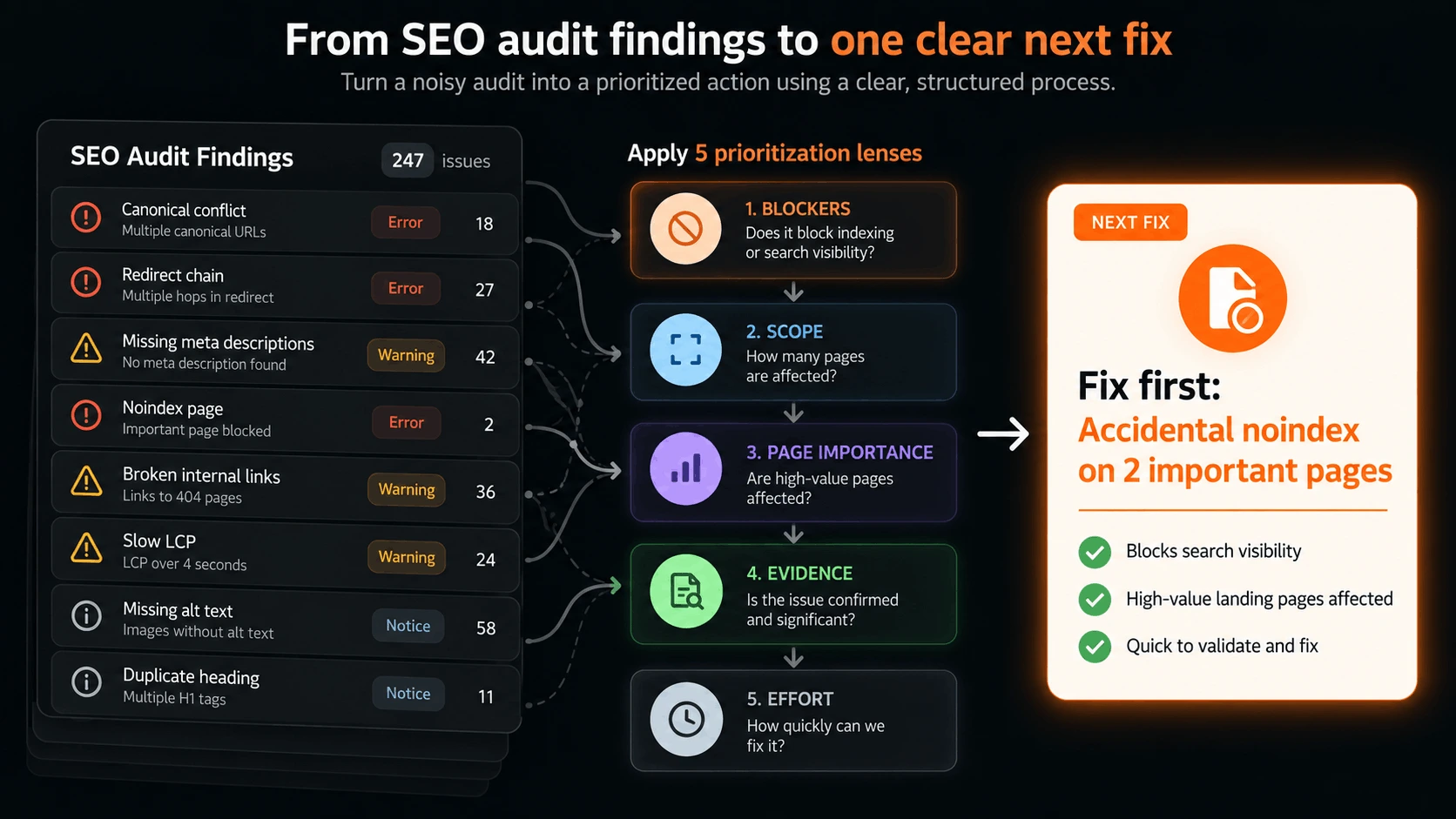 From a long SEO audit to one clear next fix
What is SEO audit prioritization?
SEO audit prioritization is the process of deciding which audit finding deserves action first.
It happens after the audit has surfaced observations such as:
- blocked pages
- canonical conflicts
- redirect chains
- broken internal links
- missing titles
- duplicate headings
- slow templates
- thin pages
- missing schema
- weak internal linking
- indexation problems
- sitemap issues
The audit tells you:
What did we find?
Prioritization asks:
Which finding matters most right now?
Those are different jobs.
A crawler is usually optimized to find as many detectable conditions as possible.
That is useful.
But the crawler does not always know:
- whether the behavior is intentional
- whether the affected pages matter
- whether the issue is systemic
- whether another fix must happen first
- whether the issue is already being resolved elsewhere
- whether the recommended fix is worth the implementation cost
So the first step after an audit is not:
Start fixing row one.
It is:
Interpret the findings before turning them into work.
For the broader framework behind that judgment, see SEO Prioritization: How to Decide What to Fix First.
Why audit severity is not enough
Many SEO audit tools classify findings as:
- Error
- Warning
- Notice
- Critical
- High
- Medium
- Low
Those labels are useful for triage.
They are not the final priority.
Imagine:
Issue A
A “critical” missing title warning on an old archive page that receives no search visibility and is not strategically important.
Issue B
A “warning” showing that the site's primary product page has almost no contextual internal links.
The audit may visually emphasize Issue A.
The business case may favor Issue B.
Severity describes the detected condition.
Priority describes the best next use of limited SEO capacity.
That requires more context.
Step 1: Confirm that the issue is actually an issue
Before prioritizing anything, verify the finding.
This sounds obvious, but audit tools frequently surface conditions that are:
- intentional
- harmless in context
- caused by expected URL behavior
- duplicate symptoms of one underlying problem
- false positives
- technically valid but strategically irrelevant
Example: canonicalized filter URLs
Suppose an audit reports:
Several
/shop?filter=...URLs canonicalize to/shop.
That may be exactly what you want if the filtered pages are not intended to rank independently.
The crawler found canonical tag issues.
The site may be behaving correctly.
Example: redirected internal URLs
An audit may flag internal links that pass through a redirect.
That can be worth cleaning up.
But if those links are on low-value pages and the redirects are intentional, they may not deserve to outrank an indexing problem on a revenue page.
Ask three verification questions
For each significant finding:
- Is the observed behavior real?
- Is the behavior undesirable?
- Does fixing it serve a meaningful SEO outcome?
If the answer to any of those is unclear, investigate before promoting it to active work.
This first verification step prevents audit output from becoming automatic task creation.
Step 2: Pull true crawl and indexation blockers to the top
Next, identify issues that prevent important pages from reliably participating in search.
Examples include:
- important pages blocked by
robots.txt - accidental
noindex - server errors on key pages
- redirect loops
- incorrect canonicals on important pages or templates
- broken discovery paths
- major rendering failures
- sitemap/discovery failures that materially affect important content
These issues often deserve immediate attention because other optimization work depends on the page being accessible and indexable first.
Blocker does not mean “anything technical”
Do not turn every technical issue into a blocker.
For example:
- one missing meta description
- one oversized image
- a slightly long title tag
- an unused redirect
- a low-value archive page with a heading warning
may all be legitimate findings.
They are not necessarily blockers.
A blocker should answer:
Does this condition prevent or seriously weaken the ability of an important page, section, or template to function in search?
If yes, it belongs near the top.
If no, continue evaluating.
Step 3: Measure the affected scope
After blockers, ask:
How much of the site does this issue affect?
Scope changes priority.
An issue may affect:
- one URL
- ten URLs
- one template
- an entire section
- nearly the whole site
A template-level canonical bug can matter more than 200 individual title warnings because one implementation change may correct a structural issue across the site.
Likewise, an isolated issue on the homepage or primary product page may matter more than a widespread issue on low-value archive pages.
So scope should never be read without importance.
The useful combination is:
How much is affected × how important is what is affected?
Think in implementation units
Do not create one task per affected URL if the fix belongs to one template.
For example:
243 category pages have the same wrong canonical rule
is usually:
one template-level task
not 243 tasks.
This matters because audit reports count affected URLs.
Prioritization should count real implementation problems.
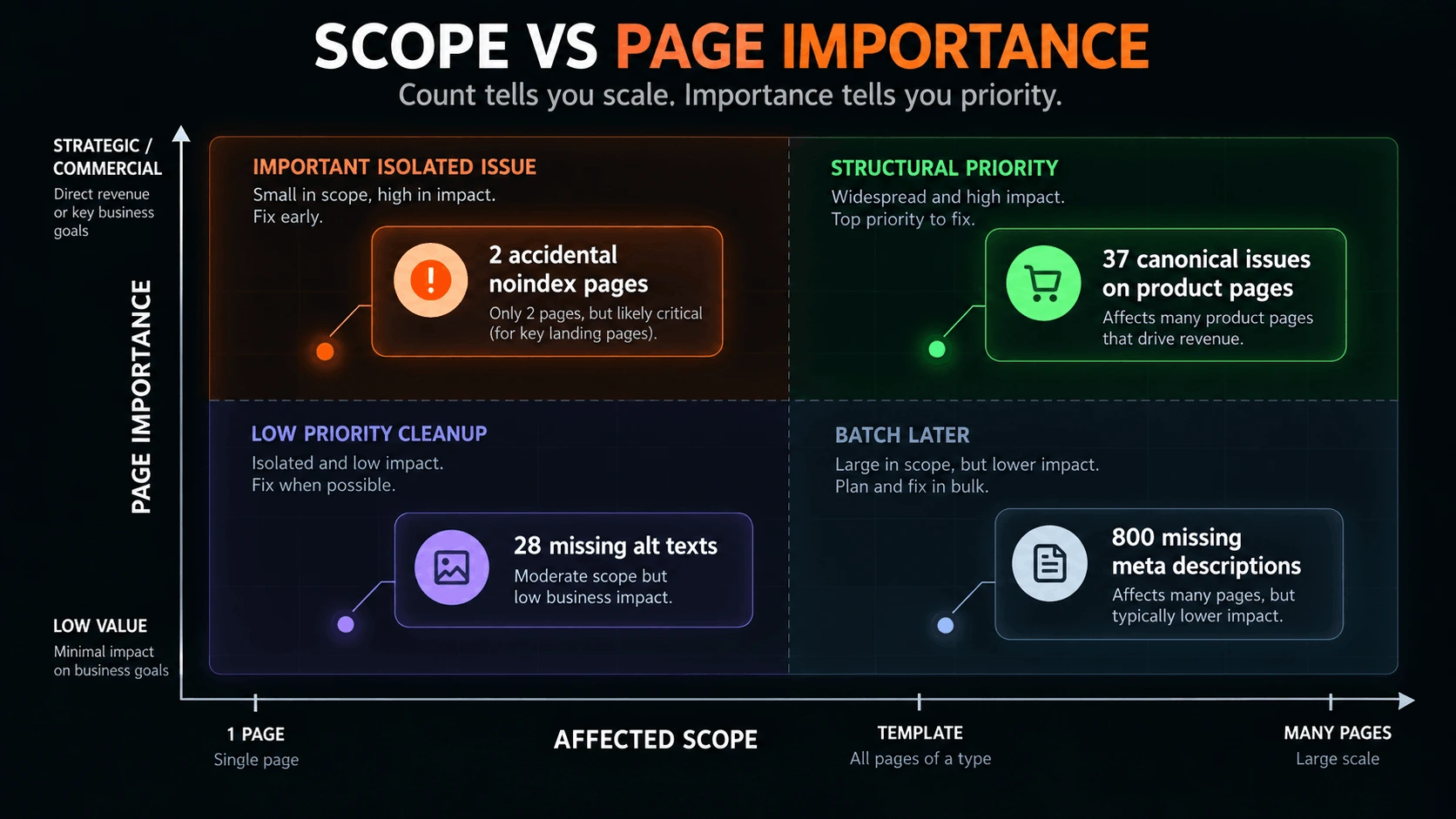 Audit priority depends on both the number of pages affected and how important those pages are
Step 4: Check the importance of the affected pages
A technically valid issue becomes more important when it affects pages that matter to the business or already show search potential.
Useful signals include:
- commercial importance
- organic impressions
- organic clicks
- ranking visibility
- conversions
- strategic role
- hub/pillar importance
- internal-link importance
- template importance
Example
Consider two findings:
Finding A
Missing meta descriptions on 800 tag pages.
Finding B
Broken canonical behavior on the site's primary comparison page.
The first finding has greater raw scale.
The second may have much greater impact.
This is why issue count alone is a poor prioritization method.
Use Search Console when available
Crawl data tells you what is technically happening.
Search Console adds another layer:
- Does the affected page receive impressions?
- Is it already ranking for relevant queries?
- Is visibility rising or falling?
- Does the issue affect a page near page one?
An audit becomes much more useful when technical observations can be interpreted alongside actual search performance.
Step 5: Evaluate likely impact and risk
Now ask what changes if the issue remains unfixed.
Useful impact questions include:
- Can the page still be crawled?
- Can it still be indexed?
- Could search engines select the wrong URL?
- Does the issue weaken discovery?
- Does it affect a high-value template?
- Does it create duplicate or conflicting signals?
- Does it reduce the page's ability to match intent?
- Does it make future publishing less reliable?
Useful risk questions include:
- Could the problem spread as more pages are published?
- Does it affect a shared template?
- Could a migration make it worse?
- Could fixing it incorrectly create a regression?
- Is the current behavior unstable or inconsistent?
High risk can outrank easy wins
Suppose:
- a canonical bug affects every new product page
- a set of metadata improvements would take only one hour
The metadata work may be easier.
The canonical issue may deserve the priority because every new page inherits the problem.
Prioritization is not a quick-win contest.
Step 6: Check the quality of the evidence
Audit tools can identify conditions.
They do not always prove causation.
That matters.
For example:
Page is slow
is an observation.
But whether speed is currently the main reason a page underperforms is a different question.
Likewise:
Missing H1
may be technically undesirable.
But if the page is irrelevant, low-value, and never intended to rank, fixing the H1 may not matter.
Stronger evidence usually combines several signals.
Stronger evidence example
Instead of:
This page has few internal links.
you have:
- the page is strategically important
- it is indexable
- it already receives impressions
- internal-link count is much lower than surrounding priority pages
- related pages exist but do not link to it
Now the finding is more actionable.
Weak evidence should reduce urgency
A finding does not need to be ignored because evidence is incomplete.
But it may need to move into:
Investigate
rather than:
Fix now
That distinction prevents speculative work from consuming execution capacity.
Step 7: Check dependencies before choosing the fix
Audit findings often depend on one another.
For example:
- you want to improve internal links to a page
- but that page currently canonicalizes to another URL
The canonical issue comes first.
Another example:
- you want to publish supporting content
- but the pillar page is being rewritten because it targets the wrong intent
The pillar should be resolved before the supporting cluster expands.
Another:
- you want to optimize metadata on a template
- but the template is being replaced next week
The task may no longer be worth doing.
Ask:
What must happen first for this fix to make sense?
Dependencies turn a flat audit list into a sequence.
Step 8: Estimate effort only after importance is clear
Effort is useful.
But it should not decide the priority too early.
If teams sort the audit by easiest fix first, they often spend hours clearing:
- title warnings
- minor metadata issues
- image attributes
- low-value page cleanup
while structural problems remain.
Estimate effort after you understand:
- severity
- scope
- page importance
- impact
- evidence
- dependencies
Then effort helps break ties.
Example
Two findings are both high-impact.
Issue A
Can be fixed with one CMS rule change.
Issue B
Requires a full template rebuild and design review.
If both are genuinely valuable, Issue A may deserve the immediate slot because it can be shipped and validated quickly.
That is a legitimate use of effort.
A practical SEO audit prioritization framework
You can summarize the process with seven questions:
| Question | What it tells you |
|---|---|
| Is the finding real and undesirable? | Whether it should become work at all |
| Is it a blocker? | Whether it should jump ahead of ordinary optimization |
| What is the affected scope? | Whether it is isolated, template-wide, or sitewide |
| How important are the affected pages? | Whether the issue touches meaningful search/business assets |
| What is the likely impact or risk? | What changes if it remains unfixed |
| What evidence supports action? | How confident you should be |
| What dependencies and effort exist? | What sequence and implementation cost make sense |
Do not turn those into a fake precision score unless your team genuinely benefits from scoring.
For most small teams, comparison is enough.
Worked example: prioritizing an SEO audit
Suppose an audit returns these findings:
- 37 product pages have inconsistent canonicals
- 112 old blog posts have missing meta descriptions
- the main product page has only two contextual internal links
- 14 URLs redirect through two hops
- 9 pages are accidentally
noindex - the homepage has a slow LCP
- 28 images are missing alt text
At first glance, the biggest number is:
112 missing meta descriptions
But count is not priority.
Step 1: confirm the findings
The noindex pages are checked manually.
Seven are intentionally excluded.
Two are important landing pages and should be indexed.
Now the real problem is:
2 important pages are accidentally noindex
not:
9 noindex warnings.
Step 2: identify blockers
The two important noindex pages cannot participate properly in search.
That becomes the clearest immediate blocker.
Step 3: assess scope and page importance
The canonical issue affects 37 product pages through one shared template.
That is structural and affects commercially important pages.
It likely becomes the next major fix.
Step 4: inspect evidence
The main product page receives meaningful impressions but has very weak contextual internal support.
That makes the internal-link issue more credible than the raw audit label alone suggests.
Step 5: consider dependencies
The redirects are legacy URLs with no meaningful internal links pointing to them.
They matter less right now.
Step 6: consider effort
The noindex problem can be corrected and validated quickly.
The canonical template fix requires engineering work.
So the sequence becomes:
| Finding | Treatment |
|---|---|
| Accidental noindex on 2 important pages | Fix first |
| Canonical inconsistency across product template | Fix next |
| Weak internal links to main product page | Next |
| Homepage LCP | Investigate / schedule based on severity |
| Redirect chains | Defer / batch |
| Missing meta descriptions | Low priority |
| Missing alt text | Batch when relevant |
That is a prioritization outcome.
The audit itself only gave you the ingredients.
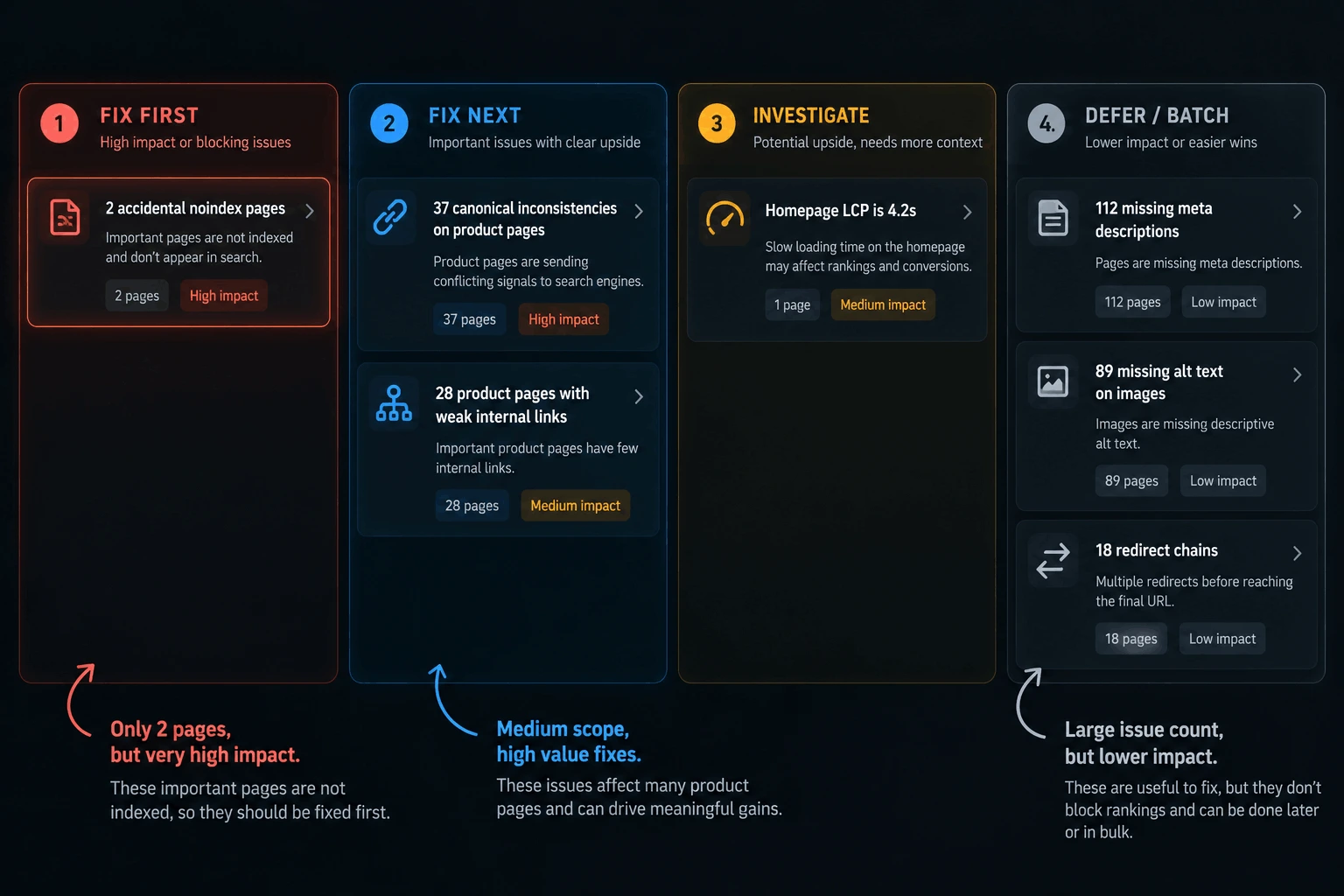 A worked audit example showing how raw findings become a prioritized execution order
Why issue count is a dangerous shortcut
SEO audits often encourage quantity-based thinking.
You see:
- 400 missing alt attributes
- 250 title warnings
- 120 redirect notices
- 60 canonical warnings
and assume the largest number is the biggest problem.
But quantity can be misleading.
A single template bug may affect every important page.
One accidental noindex on a high-value landing page may matter more than hundreds of cosmetic warnings.
So use issue count to understand scale.
Do not use it as a substitute for priority.
Why “high impact, low effort” is useful but incomplete
An impact/effort matrix can help.
But SEO audit findings have additional dimensions:
- blocking behavior
- page importance
- evidence quality
- dependencies
- risk
- implementation scope
A high-impact, low-effort task may look attractive but still depend on another fix.
Likewise, a high-impact, high-effort issue may deserve immediate attention if it affects crawlability or indexation across an important template.
So use impact × effort as one lens.
Do not make it the whole model.
What should usually be fixed first after an SEO audit?
There is no universal fixed order, but a practical default is:
1. Crawl and index blockers
Examples:
- accidental noindex
- blocked important sections
- server errors
- redirect loops
- broken discovery paths
2. Canonical and duplication problems on important pages
Especially when they affect:
- product templates
- category templates
- key landing pages
- content hubs
3. Internal-linking failures affecting priority pages
Especially when:
- important pages are almost isolated
- supporting pages exist but do not reinforce them
- broken paths prevent discovery
4. Search-intent and content problems on visible pages
Especially when the page already receives relevant impressions.
5. Performance and structured-data issues where evidence supports action
These can be important.
They should not automatically outrank more fundamental problems.
6. Cosmetic or low-value cleanup
Examples:
- low-value metadata warnings
- minor formatting issues
- isolated image attributes
- low-priority archive cleanup
These are often good batch work.
They are rarely where you should start.
Technical audit findings vs content findings
Not every SEO audit problem is technical.
A useful audit may also surface:
- weak content
- intent mismatch
- cannibalization
- underlinked priority pages
- thin supporting coverage
Do not force those into a technical-only scoring model.
If an important page is technically healthy but fundamentally wrong for the query, content can be the real next fix.
That is why the broader diagnostic framework in What to Fix First in SEO: Technical, Content, or Authority? is useful after the obvious technical blockers are cleared.
Turn audit findings into bounded tasks
Once a finding wins priority, do not hand the executor the raw audit message.
Convert it into a task.
Bad:
Fix canonical issues.
Better:
Update canonical generation for parameterized product-filter URLs so they resolve to the intended canonical collection URL, without changing self-referencing canonicals on standalone product pages. Validate representative URLs after deployment.
A strong audit task should include:
- outcome
- reason
- affected scope
- required change
- constraints
- owner/executor
- validation criteria
For the execution layer, see SEO Task Management: How to Organize and Execute SEO Work.
Validate before moving to the next audit issue
A task is not complete because:
- code was merged
- content was published
- the ticket moved to Done
Re-check the actual site.
Depending on the fix, validate:
- rendered canonical tags
- indexability
- HTTP status
- internal links
- redirect destination
- structured data
- sitemap output
- page content
- Search Console behavior over time
Then reprioritize from current reality.
Do not blindly move to “issue number two” from the old audit.
The site has changed.
Your priority order may need to change too.
SEO audit prioritization vs SEO task prioritization
These are close, but not identical.
SEO audit prioritization starts with:
crawler/audit findings
and asks:
Which finding deserves action first?
SEO Task Prioritization starts with:
an existing backlog of concrete tasks
and asks:
Which task should move to the top?
An audit finding may still need interpretation before it becomes a task.
That is the key difference.
Where RankQuest fits
RankQuest is built around the gap between SEO observations and decisions.
Instead of treating every detected condition as an active task, RankQuest continuously observes the site, derives signals from the current state, and surfaces at most one active SEO decision when something deserves action.
That decision explains:
- what is happening
- why it matters
- what should happen next
- the evidence behind the judgment
It can then open into a bounded Implementation Room, where the execution stays tied to the selected issue instead of expanding into another audit backlog.
Depending on the decision, RankQuest can provide:
- step recommendations
- generated implementation material
- structured outputs
- AI-agent-ready prompts
After implementation, the site can be re-observed.
That means the workflow becomes:
Observe → Decide → Implement → Validate → Re-observe
rather than:
Audit → export 300 issues → manually sort forever
Turn your SEO audit into one clear next action
RankQuest continuously observes your site, identifies what deserves action, and gives you a bounded path to implement it.
Start with your site →
Common SEO audit prioritization mistakes
Fixing issues in the order the tool lists them
Tool order is not your execution order.
Treating every warning as a task
A finding needs interpretation before it becomes active work.
Sorting only by severity
Severity lacks page importance, business context, dependencies, and effort.
Sorting only by issue count
Scale matters.
Importance matters too.
Fixing the easiest issues first
Quick wins can become busywork.
Ignoring template-level causes
Hundreds of page-level warnings may come from one shared implementation problem.
Ignoring Search Console
Crawl evidence becomes stronger when paired with actual search visibility.
Skipping validation
The audit found a problem.
That does not prove the fix worked.
A simple post-audit checklist
Before choosing the first fix, ask:
- Is the finding real?
- Is the behavior actually undesirable?
- Is it blocking crawlability or indexation?
- How many pages/templates are affected?
- How important are those pages?
- Do we have supporting search-performance evidence?
- What happens if we leave it unfixed?
- Does another task need to happen first?
- Is this one real implementation task or many duplicate symptoms?
- Can we define how to validate the fix?
Then choose the next bounded issue.
Not the whole audit.
What to read next
For the broader framework behind deciding what deserves attention, read SEO Prioritization: How to Decide What to Fix First.
If the audit has already been converted into a task backlog, read SEO Task Prioritization: How to Prioritize Your SEO Backlog.
If you are unsure whether the real constraint is technical, content, internal support, or authority, read What to Fix First in SEO.
For the complete evidence-to-execution loop, read SEO Workflow: How to Turn SEO Data Into Action.
For organizing ownership, execution, dependencies, and validation after a task is selected, read SEO Task Management: How to Organize and Execute SEO Work.
An SEO audit should end in a decision
A good audit is not valuable because it found the most issues.
It is valuable because it helps you make better changes.
The useful sequence is:
Confirm → Blockers → Scope → Page importance → Evidence and risk → Dependencies → Effort → Next fix
Then execute.
Validate.
Re-observe the site.
And decide again.
The audit gives you visibility.
Prioritization turns that visibility into progress.
Related guides
- SEO Prioritization: How to Decide What to Fix First
- SEO Task Prioritization: How to Prioritize Your SEO Backlog
- What to Fix First in SEO: Technical, Content, or Authority?
- SEO Workflow: How to Turn SEO Data Into Action
- SEO Task Management: How to Organize and Execute SEO Work
- RankQuest Technical SEO Audit Tool Guide