Guide
SEO Task Prioritization: How to Prioritize Your SEO Backlog
Updated September 2026
SEO task prioritization is the process of deciding which task in an existing SEO backlog should move to the top, which should wait, and which may not deserve active work at all.
If your backlog contains technical fixes, content updates, internal-linking work, Search Console opportunities, old audit findings, and stakeholder requests, do not rank them by:
- tool severity alone
- whoever asked most recently
- whichever task looks easiest
- how many warnings exist
- which item has been sitting in the backlog longest
Instead, reduce the backlog using a clearer sequence:
Remove blockers → Group related work → Check dependencies → Compare impact → Check evidence → Estimate effort → Select the next bounded task
The goal is not to create a perfect priority score.
The goal is to turn a noisy backlog into a sequence you can defend and execute.
 A practical SEO backlog prioritization process from competing tasks to one next action
What is SEO task prioritization?
SEO task prioritization is narrower than general SEO strategy.
It begins when work already exists.
You may already know that you need to:
- fix canonical inconsistencies
- improve internal links
- refresh a page losing traffic
- create a missing supporting guide
- improve site speed
- repair broken links
- update structured data
- rewrite title tags
- investigate an indexing issue
The question is no longer:
What SEO work exists?
It is:
Which of these tasks should happen first?
That makes SEO task prioritization a backlog problem.
You are comparing valid pieces of work against one another and deciding which one deserves active capacity now.
For the broader strategic framework behind those choices, read SEO Prioritization: How to Decide What to Fix First.
Clean the backlog before you rank it
Do not prioritize a backlog that is full of duplicates, vague ideas, and tasks that are not actually ready.
First clean it.
Remove duplicate tasks
SEO tools often describe the same underlying problem in several ways.
For example:
- canonical mismatch
- duplicate URL warning
- conflicting canonical target
- parameterized page canonical issue
Those may be four observations about one implementation problem.
Do not rank them as four separate tasks.
Group them into one bounded item if they share:
- the same cause
- the same implementation path
- the same affected template or page group
- the same validation method
Combine tasks that share one implementation scope
A template-level issue affecting 200 pages may be one task.
An internal-linking change across six guides may be one task.
A content-cluster update may involve several pages but still belong to one coordinated piece of work.
Prioritize the real unit of execution, not every individual URL.
Remove tasks that are only observations
An observation is not automatically a task.
For example:
23 pages have short meta descriptions.
That may be worth investigating.
It is not yet a task unless you know:
- the pages matter
- the descriptions are actually weak
- the work has a plausible benefit
- the change belongs ahead of other work
Rewrite vague tasks
A backlog item such as:
Improve SEO
cannot be prioritized responsibly.
Neither can:
Fix technical issues
or:
Update content
Make the task concrete enough that you can compare it with other work.
For example:
Fix canonical generation for parameterized
/shopfilter URLs while preserving product-page canonicals.
Now you can reason about scope, dependencies, impact, and effort.
Step 1: Pull true blockers to the top
Before comparing ordinary backlog tasks, identify work that blocks reliable crawling, indexing, observation, or execution.
Examples may include:
- important pages blocked by
robots.txt - critical sections marked
noindex - redirect loops
- broken discovery paths
- widespread canonical rules pointing important pages to the wrong destination
- a deployment problem preventing validation
- a dependency that prevents several other tasks from being executed
A true blocker should usually outrank ordinary optimization work because the rest of the backlog may depend on it.
But do not confuse:
blocker
with:
tool says “critical.”
A high-severity warning on an unimportant page is not automatically a site-level blocker.
The question is:
Does this condition prevent important SEO work or search visibility from functioning reliably?
Step 2: Group tasks by what they change
Backlogs become easier to prioritize when related items are grouped by the system they affect.
Useful groups include:
Technical foundation
Examples:
- crawling
- indexation
- canonicals
- redirects
- sitemap behavior
- rendering
- structured data
Existing-page improvement
Examples:
- title/H1 changes
- content refreshes
- search-intent alignment
- internal-link improvements
- conversion-supporting content
Content expansion
Examples:
- new pillar pages
- supporting guides
- comparisons
- workflows
- templates
- new search-demand pages
Architecture and linking
Examples:
- orphaned pages
- weak hub relationships
- missing contextual links
- poor navigation/discovery paths
This is not about creating permanent categories for project management.
It helps you see whether the backlog contains several symptoms of the same underlying problem.
Step 3: Check dependencies before impact
A task can be important and still be the wrong first task.
Ask:
What must be true before this work can succeed?
For example:
You want to add internal links to a new pillar.
But the pillar does not exist yet.
The dependency is obvious:
Create the pillar first.
Another example:
You want to publish several supporting articles around a topic.
But the current pillar is being rewritten because its search intent is wrong.
Publishing the supporting pages first may reinforce a weak structure.
Another:
You want to optimize the metadata of a template.
But the canonical logic for that same template is broken.
The metadata task may be valuable later, but the canonical dependency may deserve the current slot.
A dependency is not necessarily more important in absolute terms.
It is simply something that needs to happen first.
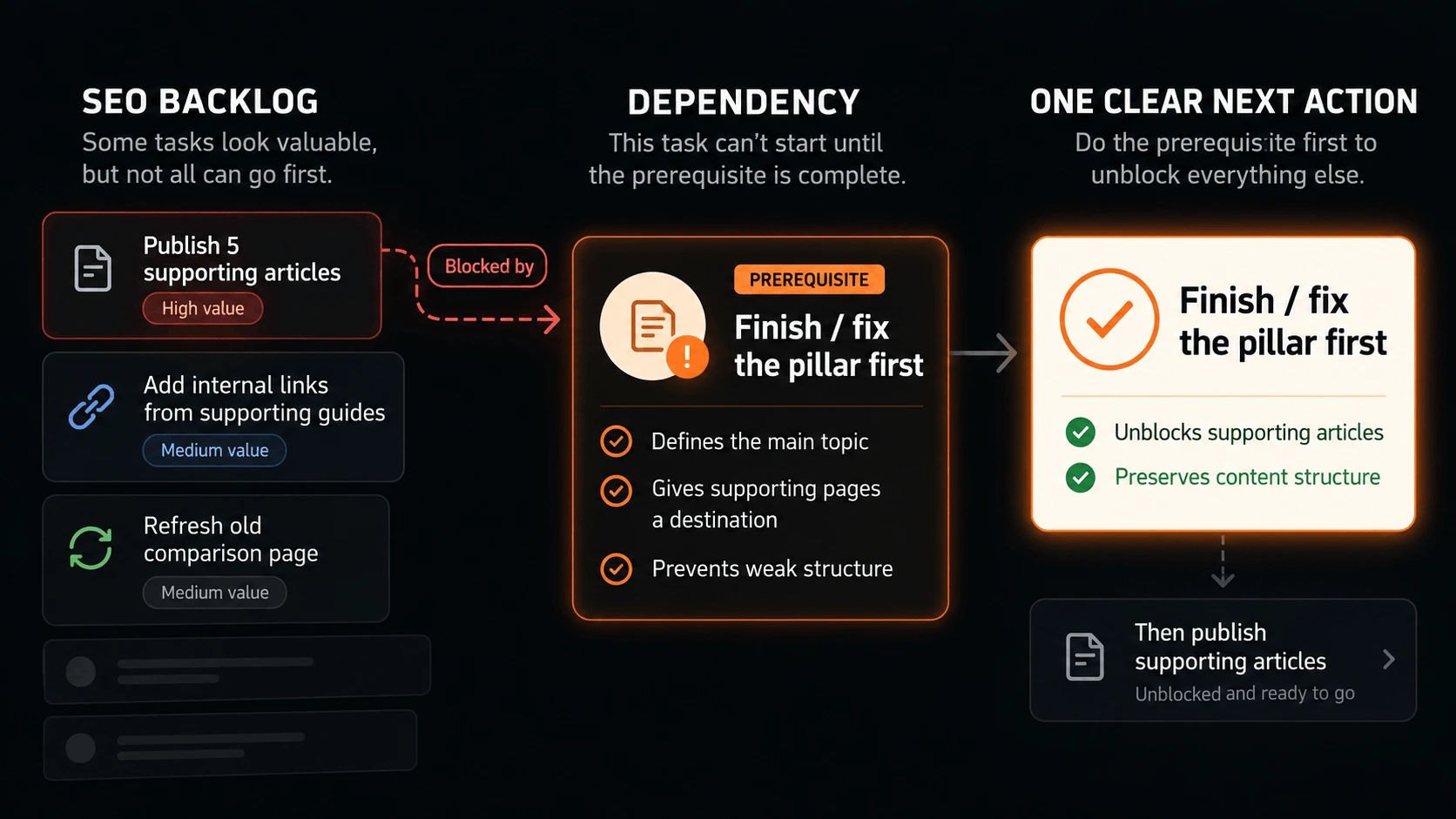 SEO task prioritization should account for dependencies before ranking downstream work
Step 4: Compare impact
Once blockers and dependencies are clear, compare what meaningfully changes if each task is completed.
Impact is not:
Could this theoretically improve SEO?
Almost everything could.
Ask instead:
- Does this affect an important page or template?
- Does it improve crawling or discovery?
- Does it protect search visibility?
- Does it act on proven search demand?
- Does it strengthen a commercially important page?
- Does it unlock several other tasks?
- Does it correct a problem across many valuable pages?
- Does it materially improve the site's content architecture?
Example
Suppose the backlog contains:
Task A
Rewrite five old blog posts with little traffic.
Task B
Repair broken contextual links pointing to the site's highest-value landing page.
Both are legitimate.
But Task B may have greater current impact because it strengthens an already-important page and repairs a structural weakness.
Impact should be evaluated against the site's current situation, not against how impressive the task sounds.
Step 5: Check the evidence
Two tasks can have similar potential impact while having very different levels of evidence behind them.
Consider:
Task A
Create a new article because this keyword looks interesting.
Task B
Update an existing article already receiving meaningful impressions for relevant queries but ranking outside page one.
Task B may deserve priority because the opportunity is already visible in real search data.
Useful evidence can include:
- crawl observations
- Google Search Console impressions and clicks
- indexing state
- internal-link structure
- page importance
- SERP intent
- template behavior
- historical performance
- repeatable technical observations
Evidence does not eliminate uncertainty.
It helps distinguish:
a plausible idea
from:
a problem or opportunity we can actually see.
Step 6: Estimate effort and execution risk
Effort matters, but it should come after blockers, dependencies, impact, and evidence.
Otherwise teams end up prioritizing whatever is easiest.
A useful effort check includes:
- engineering time
- content time
- design requirements
- stakeholder review
- deployment complexity
- number of affected templates/pages
- regression risk
- ease of validation
Low effort is not automatically high priority
Changing ten title tags may take one hour.
Fixing a canonical template may take a day.
If the canonical issue affects important pages and the title changes are mostly cosmetic, the longer task may still deserve priority.
High effort can change sequencing
Effort becomes useful when two tasks are both valuable.
If:
- Task A has strong evidence, high impact, and can ship today
- Task B has similar impact but requires a three-week redesign
Task A may deserve the next slot.
The goal is not:
highest impact regardless of reality
or:
easiest work first
It is:
the best next use of limited execution capacity.
A practical SEO backlog prioritization method
After cleaning the backlog, evaluate each remaining task using five questions:
| Question | What you are checking |
|---|---|
| Is it a blocker? | Does other work or search visibility depend on this? |
| What depends on it? | Does it need to happen before another task? |
| What is the impact? | What meaningfully improves if it is completed? |
| How strong is the evidence? | How confident are we this deserves action? |
| What is the effort/risk? | Can we execute and validate it cleanly? |
You do not need to turn these into a 100-point formula.
Use them to compare tasks.
Then choose the next bounded piece of work.
Worked example: prioritize a seven-task SEO backlog
Imagine your backlog contains:
- fix canonical inconsistencies on filtered collection URLs
- publish five new articles
- improve internal links to an important product page
- refresh an article ranking around positions 11–20
- rewrite homepage messaging
- clean up missing meta descriptions
- improve site speed
Without context, all seven can sound important.
Now reduce the backlog.
First: check blockers
Suppose the canonical issue affects an important shared template and sends conflicting signals across indexable pages.
That moves Task 1 near the top.
The other tasks are not blocked technically, but this is a structural problem affecting existing pages.
Second: check dependencies
The five proposed new articles are meant to support an existing pillar that is currently being rewritten.
That means Task 2 is dependent on the pillar work being resolved first.
It should not be active yet.
Third: compare impact
The important product page already has commercial value but receives weak contextual internal support.
Task 3 has meaningful impact.
The missing meta descriptions affect mostly low-priority archive pages.
Task 6 moves down.
Fourth: check evidence
The page-two article has Search Console impressions for relevant queries.
Task 4 has direct evidence of an existing opportunity.
Fifth: compare effort
Suppose the result looks like this:
| Task | Blocker / dependency | Impact | Evidence | Effort | Current treatment |
|---|---|---|---|---|---|
| Canonical template fix | Structural issue | High | Strong crawl evidence | Medium | Do first |
| Internal links to product page | No blocker | High | Strong | Low | Next |
| Page-two article refresh | No blocker | Medium–high | Strong GSC evidence | Medium | Next |
| Publish five articles | Depends on pillar | Potentially high | Mixed | High | Defer |
| Homepage rewrite | Strategic dependency unclear | Medium | Mixed | High | Reassess |
| Missing meta descriptions | None | Low | Weak | Low | Defer |
| Site speed improvement | Depends on actual performance issue | Unknown | Needs evidence | High | Investigate |
Now the backlog has a sequence.
That is the result you want.
Not a prettier list of seven competing priorities.
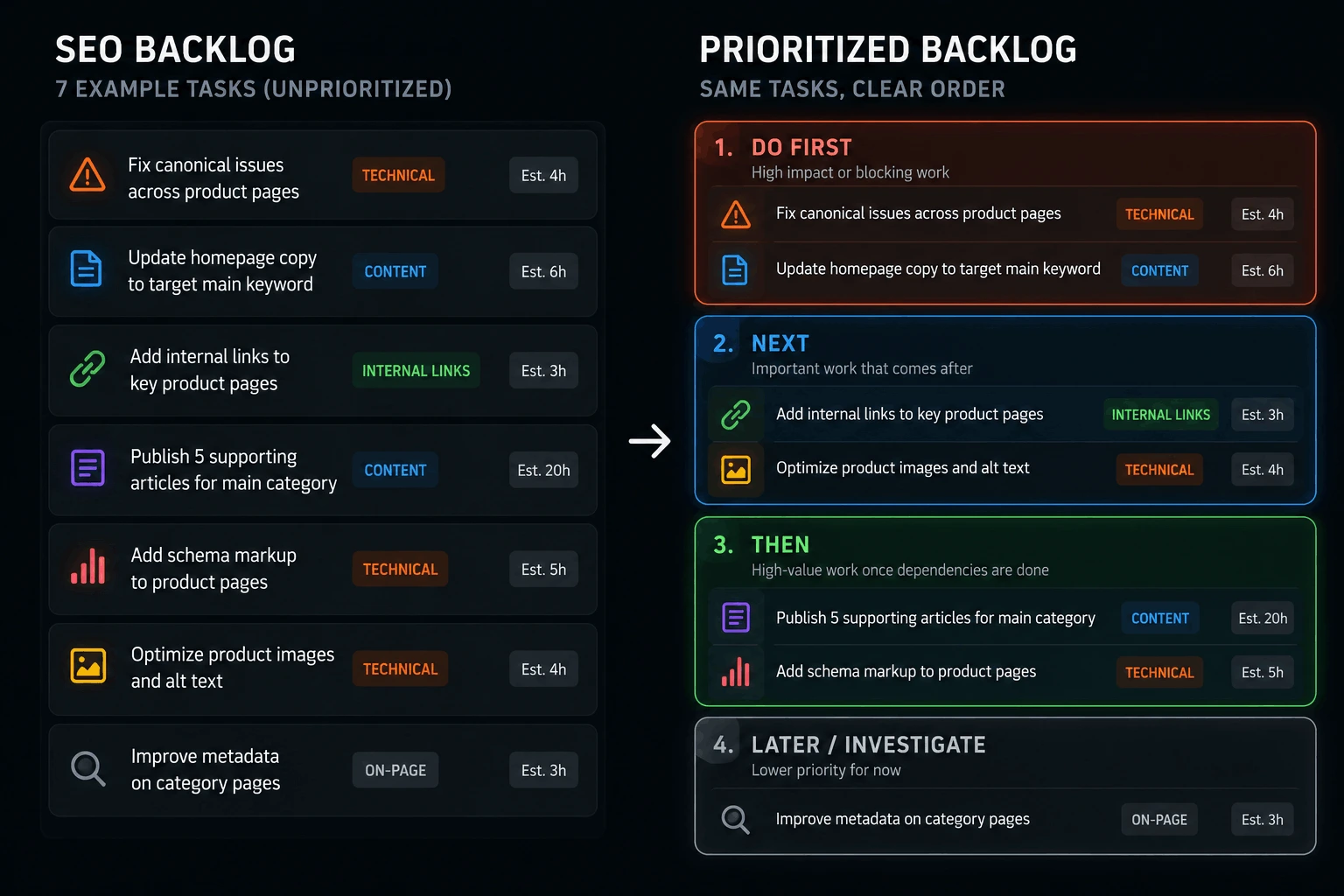 A worked SEO backlog example showing which task moves first and which tasks should wait
What about priority scores?
Scores can help when you have many similar tasks.
But they can also create false precision.
A formula such as:
Impact × Confidence ÷ Effort
looks objective.
But the inputs still depend on judgment.
Was impact a 7 or an 8?
Is confidence 60% or 75%?
Does the score account for a blocking dependency?
Does a template-wide canonical issue belong in the same scoring system as a content refresh?
For a large team, a lightweight score may help create consistency.
For a small team, the five-question comparison is often enough.
Use scores to support judgment.
Do not let the score replace it.
Why P0 / P1 / P2 labels are not enough
Priority labels are useful shorthand.
But they do not explain why something is P0 or P1.
A backlog can quickly become:
P0
P0
P0
P1
P1
P1
P1
and you are back where you started.
A useful priority label should be the result of reasoning, not the reasoning itself.
Instead of:
P0 — fix internal links
record:
P0 because this affects the primary product page, the problem is verified, there is no unresolved dependency, and the fix is bounded.
Now the priority is explainable.
When should you defer a task?
Defer work when:
- a dependency is unresolved
- impact is currently low
- evidence is weak
- a higher-leverage task occupies the same capacity
- the affected page is not important
- the task is valid but not timely
- another planned change may make the task obsolete
Deferred does not mean fake.
It means:
not now.
This is one of the most important disciplines in SEO.
If every valid issue remains active, the backlog stops functioning as a sequence.
For more on this, read How to stop wasting time on low-impact SEO work.
When should you delete a task?
Some backlog items should disappear entirely.
Delete or close a task when:
- the observation was wrong
- the issue is intentional
- another task resolves the same underlying problem
- the page no longer exists
- the opportunity no longer fits the business
- the task has been superseded
- new evidence shows the work is unnecessary
SEO backlogs accumulate historical debris.
Cleaning that debris is part of prioritization.
How often should you reprioritize the backlog?
Do not rebuild priorities every morning.
But do not freeze them for six months either.
Reprioritize when meaningful evidence changes.
Useful triggers include:
- a priority task is completed
- a new crawl reveals a blocker
- a major deployment changes site structure
- Search Console reveals a meaningful opportunity
- a dependency is resolved
- a migration starts
- a planned page is published
- the business changes direction
A stable site may need less frequent review.
A fast-moving product site may need more.
The important thing is that the backlog reflects current reality.
SEO task prioritization vs SEO task management
These are related, but they are not the same job.
SEO task prioritization asks:
Which task should move to the top?
SEO task management asks:
Once we choose it, how do we organize ownership, execution, status, dependencies, and validation?
Prioritization decides what gets capacity.
Task management makes sure the chosen work survives execution.
For the execution layer, read SEO Task Management: How to Organize and Execute SEO Work.
SEO task prioritization vs the broader SEO workflow
Task prioritization is one stage inside a larger operating loop.
A complete SEO workflow looks more like:
Observe → Interpret → Prioritize → Execute → Validate → Re-evaluate
This article focuses specifically on the moment where several possible tasks already exist and you need to determine which one should become active work.
Where RankQuest fits
RankQuest is designed around the part of SEO work that usually happens before a task board fills up.
It continuously observes the site, evaluates current signals, and surfaces at most one active SEO decision when something deserves action.
That decision explains:
- what is happening
- why it matters
- what should happen next
- the evidence behind the judgment
The decision can then open into the Implementation Room, where execution remains bounded to the active issue.
Depending on the decision, RankQuest can generate implementation guidance, structured outputs, or AI-agent-ready prompts for tools such as Cursor, Claude Code, or Codex.
After implementation, the site is re-observed.
That creates a different relationship with the backlog:
Instead of asking you to continuously rank dozens of competing SEO recommendations, RankQuest narrows the active work before execution begins.
You can still use Linear, Jira, GitHub, Notion, or another task system for broader team coordination.
RankQuest's job is not to replace project management.
It is to keep SEO judgment from becoming another endless list of possible tasks.
Stop sorting an endless SEO backlog
RankQuest continuously observes your site, identifies what deserves action, and gives you a bounded path to execute it.
Start with your site →
A simple SEO backlog checklist
Before moving a task to the top, ask:
- Is this a true blocker?
- Is it actually one task, or several duplicate observations?
- What other work depends on it?
- What changes if we complete it?
- Do we have evidence that the problem or opportunity is real?
- Is the affected page, template, or cluster important?
- Can the task be scoped clearly?
- Can we implement and validate it?
- Is there a more valuable use of the same capacity?
If you cannot answer those questions, the task may need clarification before prioritization.
What to read next
For the broad framework behind deciding what matters in SEO, read SEO Prioritization: How to Decide What to Fix First.
For the complete operating loop from evidence to execution, read SEO Workflow: How to Turn SEO Data Into Action.
For organizing ownership, status, dependencies, handoffs, and validation after a task is selected, read SEO Task Management: How to Organize and Execute SEO Work.
If you are unsure whether technical, content, or authority work should come first, read What to Fix First in SEO.
If your backlog keeps expanding because everything remains active, read What “one SEO decision at a time” looks like in practice.
A backlog should become a sequence
A useful SEO backlog is not a warehouse for every recommendation anyone has ever generated.
It should help you decide:
what is active now, what is next, what is deferred, and what no longer deserves attention.
The practical sequence is:
Remove blockers → Group related work → Check dependencies → Compare impact → Check evidence → Estimate effort → Select the next bounded task
Then execute it.
Validate it.
Update the backlog with what is true now.
And choose again.
That is SEO task prioritization.