Guide
Common SEO Audit Mistakes | ai seo software
Updated August 2026
Common SEO Audit Mistakes That Create More Work
Introduction
The most expensive SEO audit mistake is treating the audit as the work. A report can identify broken links, missing metadata, duplicate pages, slow templates, and unclear content signals, but none of those findings help until someone decides what matters, what can wait, and what action the team can actually ship.
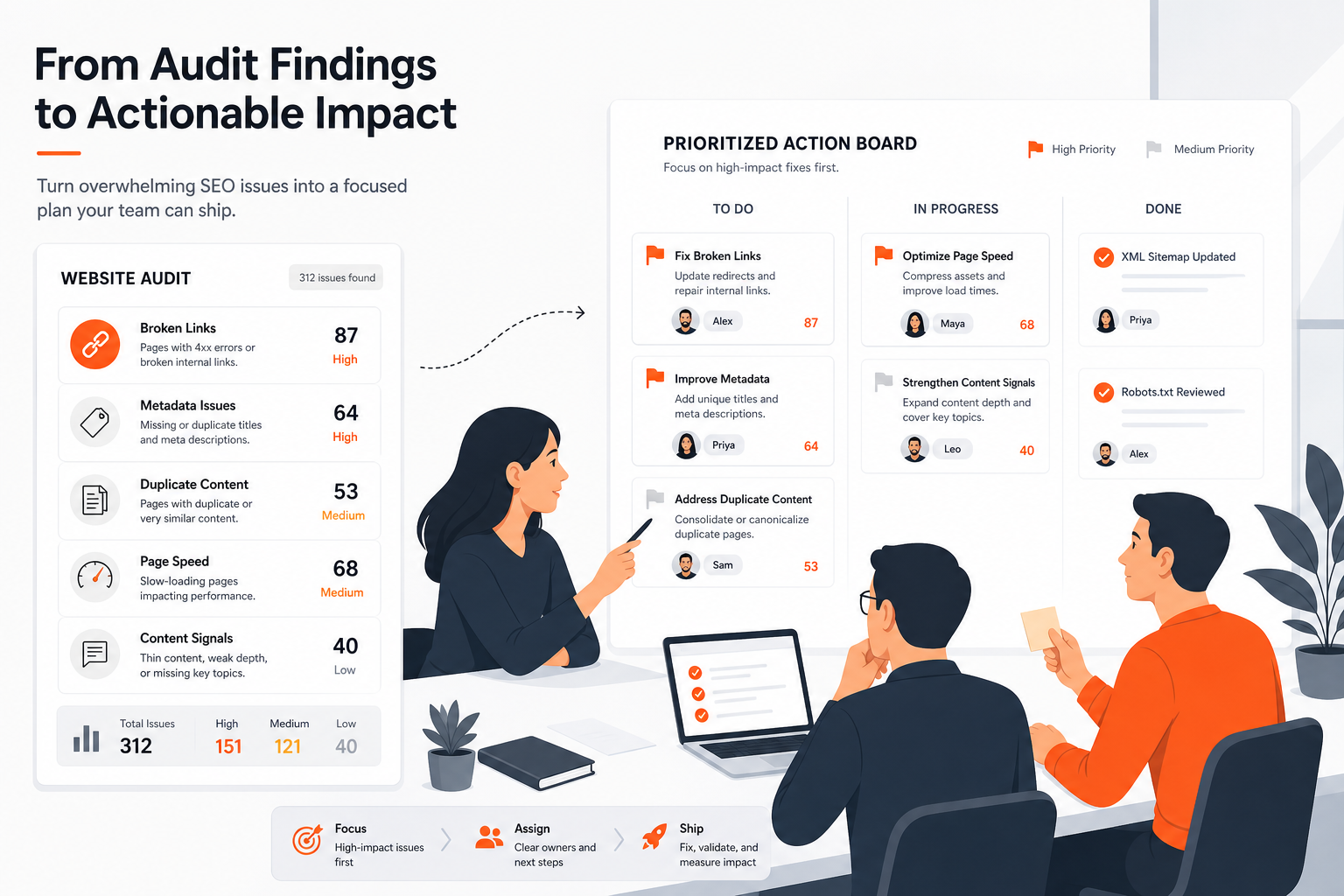 From SEO Audit Findings to Action
For small teams, the problem usually appears after the audit. Issues remain open, priorities change whenever a new report arrives, and recommendations are handed to developers or writers without enough context to act on them. The team keeps collecting information without creating a dependable order of work.
The better operating model is simple: use audit data to choose the next worthwhile action, then turn that decision into a clear handoff. A useful audit process separates technical severity from business priority, groups related findings, considers effort and risk, and records the reason for each decision.
This guide focuses on that narrower problem. It does not compare every site audit software feature. Instead, it explains the habits that create more work and shows how a small team can move from a long findings list to a short, implementable queue.
Why audit findings create more work
Audit tools are good at finding conditions. They are not automatically good at deciding which condition deserves attention first.
A crawler may flag hundreds of pages with missing descriptions. That sounds urgent because the count is high. Yet a small set of pages may account for most of the site's search value, while the remaining pages are low-priority templates, outdated URLs, or pages that should not receive further work.
The reverse can also happen. A single issue affecting an important page template may be more valuable to fix than dozens of isolated warnings. If the team sorts only by issue count, it can spend a week cleaning up low-impact pages while a recurring template problem remains.
The key distinction is:
- Finding: what the audit observed.
- Risk: what could go wrong if the issue remains.
- Opportunity: what could improve if the team addresses it.
- Action: the specific change someone can make.
- Priority: the reason this action should happen before another one.
A practical audit process moves through all five. A weak process stops at the first one.
Mistake: treating every finding as equally urgent
An audit list often mixes severe technical problems with minor hygiene issues. When every row receives the same urgency, the team loses the ability to make tradeoffs.
Consider three findings:
- A group of important pages cannot be reached through the site's navigation.
- Several old URLs have inconsistent descriptions.
- A handful of images lack alternative text.
All three may deserve a place in the backlog. They do not deserve the same place in the queue. The first may affect whether users and search systems can discover key pages. The second may be worth addressing during a template update. The third may belong with the next relevant content or accessibility pass.
A finding becomes a priority when its likely value, risk, and feasibility justify acting now. Severity is useful input, but it is not the final decision.
Mistake: copying findings into a task list without interpretation
A task such as “fix canonical issues” is not ready for implementation. It does not tell the owner which URLs are affected, what the intended canonical page should be, whether the pattern is intentional, or how success will be checked.
The same problem appears in non-technical work. “Improve thin content” leaves unanswered which pages are involved, whether they should be expanded, combined, redirected, or removed, and what information the writer needs.
A useful handoff gives the next person enough context to make the change without reopening the entire audit. At minimum, it should identify:
- The affected page, template, or page group.
- The observed condition.
- Why it matters for this site.
- The recommended action.
- The person or role responsible.
- Any dependency or decision that must be resolved first.
- The evidence the team will use to confirm completion.
This does not require a long report. It requires a clear decision.
Mistake: allowing new findings to reorder the whole backlog
Continuous monitoring is valuable, but it can create noise when every new alert interrupts planned work.
Suppose a team has agreed to repair an important page template. During that work, a monitoring tool reports several new warnings on lower-value pages. If the team immediately switches direction, the original repair may never be completed. The backlog becomes a stream of reactions rather than a managed sequence.
New findings should be assessed against the current queue. They should replace planned work only when they introduce a materially higher risk or a time-sensitive dependency. Otherwise, record them, group them, and review them at the next prioritization point.
A stable review cadence helps. It gives the team a place to reconsider priorities without turning every alert into an emergency.
A practical way to prioritize and hand off findings
A small team does not need a complicated scoring system. It needs a repeatable decision process that makes the reasoning visible.
Start by grouping findings into actions rather than preserving the audit's original categories. Ten warnings may point to one template change. Five content observations may describe one decision about a page group. Grouping reduces duplicate work and makes ownership clearer.
Then assess each potential action using four questions:
-
What does this affect?
Is the action limited to one page, repeated across a template, or spread across a major section of the site? -
What is the consequence of waiting?
Could the issue block discovery, create conflicting signals, waste future work, or simply remain a minor defect? -
What is the likely value of acting now?
Will the action support an important page, remove a recurring source of errors, or make another planned task more effective? -
What will it take to ship?
Consider technical effort, review time, content work, approvals, and implementation risk.
This creates a more useful priority conversation than “the tool marked it critical.”
Separate urgency from importance
Urgency describes how quickly the team needs to respond. Importance describes the value of resolving the issue. They often overlap, but not always.
A broken rule affecting a high-value template may be important and urgent. A minor issue on a low-use page may be neither. A change needed before a planned migration may be urgent because of timing, even if its long-term value is moderate.
Use plain labels that the team can apply consistently:
- Act now: material risk, strong opportunity, or a dependency for work already planned.
- Schedule: worthwhile action that can be grouped with related work.
- Monitor: evidence is incomplete or the issue needs more observation before action.
- Do not act: the finding is intentional, irrelevant to the site's goals, or not worth the effort.
The last two labels matter. A queue filled with “to do” items eventually becomes a record of failure, even when some findings were never valid tasks.
Write actions at the right level
An action should be specific enough to ship but broad enough to avoid unnecessary duplication.
Too vague:
Fix duplicate pages.
More useful:
Review the affected page group, choose the intended primary version, then consolidate or adjust the repeated versions according to that decision.
Too narrow:
Change the title on
/example-page.
That may be correct if the issue is isolated. If the same template creates the problem across many pages, the better action may be to correct the template and review the pages it generated.
The right level is usually the smallest unit that can produce a durable change. For a repeated issue, that may be a template, rule, or workflow. For a strategic page, it may be one page with a clearly defined outcome.
Make the reason part of the handoff
A task without a reason is easy to deprioritize. A task with a short, site-specific explanation is easier to review and defend.
Compare these two handoffs:
Update internal links.
Add links from the main service page to the three supporting pages that currently have no clear route from a relevant parent. This gives visitors a direct path to the supporting information and makes the intended page relationship clear. Review the links after the page structure is updated.
The second version does not promise a ranking or traffic outcome. It explains the decision, the scope, and the completion check.
This is where implementation-focused software can be useful. Its value is not simply producing another dashboard or score. The useful output is a decision with enough evidence and context for a team member or AI agent to ship the next change.
Keep a decision record
Small teams often revisit the same finding because nobody recorded why it was postponed or rejected. A short decision record prevents that loop.
For each meaningful action, record:
- Decision: act now, schedule, monitor, or do not act.
- Reason: the main factor behind the decision.
- Owner: who can move it forward.
- Dependency: what must happen first, if anything.
- Review point: when the decision should be reconsidered.
- Completion check: what evidence will show that the action is finished.
The record can live wherever the team already manages work. The important part is not the tool. It is preserving the reasoning between audit, decision, and implementation.
Examples of weak and practical audit handling
Example 1: A large list of missing descriptions
A weak process exports every missing description as an individual urgent task. A writer receives a spreadsheet with hundreds of URLs and no guidance about which pages matter or whether the descriptions should be written manually.
A practical process first asks whether the issue comes from a page template, a migration, or isolated omissions. It then identifies the pages that deserve attention, decides whether a template change is appropriate, and creates a smaller action with a review step.
The team may still address the remaining pages later. The difference is that the work begins with a decision about scope rather than an unfiltered count.
Example 2: A crawl reports blocked pages
A blocked page is not automatically a defect. Some pages should not be crawled or indexed. Other blocked pages may be important and unintentionally inaccessible.
A weak handoff says:
Remove all crawl blocks.
A practical handoff identifies the affected page group, explains why the pages should be available or restricted, and asks the owner to confirm the intended access rule before changing anything. The action may be to remove an accidental restriction, preserve an intentional one, or investigate a wider configuration problem.
The audit finding is the starting point. The intended site behavior determines the action.
Example 3: A page has several competing versions
A team may find multiple URLs with similar content, tracking parameters, or inconsistent preferred versions. Treating every URL as a separate cleanup task can create conflicting fixes.
A better process maps the page group first. It identifies the version that should remain primary, checks how visitors reach each version, and chooses one coordinated action. Depending on the situation, that could involve consolidation, redirects, canonical signals (signals that indicate the preferred version), or a change to how links are generated.
The important output is not a longer list of URL warnings. It is one agreed page-handling decision.
Example 4: A recurring template problem
Suppose every new article inherits the same weak heading structure or produces the same metadata omission. Fixing pages one at a time may make the audit look cleaner while leaving the source of the problem untouched.
Here, a heavier technical change can be worth the effort because it prevents repeated cleanup. The tradeoff is that template work may require more coordination than editing one page. A small team should choose it when the pattern is genuinely repeated and the owner can test the change safely.
This is a useful test for overbuying and underbuying:
- If the issue is isolated, a broad system change may create unnecessary work.
- If the issue is repeated, manual fixes may only postpone the next audit problem.
Example 5: A recommendation that lacks implementation detail
“Create supporting content” is not an implementation-ready recommendation. It does not define the reader question, the relationship to existing pages, the intended owner, or the condition that would make the work complete.
A practical version might state:
Create one supporting page for the unresolved question identified in the audit, link it from the relevant main page, and define the page's purpose before drafting.
The exact content decision still needs human review. The handoff is useful because it turns a general observation into a bounded piece of work.
Mistakes to avoid
Sorting by the tool's severity label alone
Severity labels help the team notice potential risk. They do not know the site's priorities, planned releases, business context, or available owners. Use the label as evidence, then apply site-specific judgment.
Measuring audit quality by the number of closed issues
Closing many low-value issues can create a reassuring report without addressing the work that matters most. Measure whether the team made clear decisions and shipped the right changes, not whether the list became shorter.
Assigning findings without an owner who can act
A task assigned to “SEO” may still have no clear owner. Technical changes, content changes, and approvals often require different people. Name the role or person responsible for the next decision, not just the department that cares about the outcome.
Recommending changes without a completion check
“Resolve indexing concerns” cannot be verified as written. Define what the team will inspect after the change, such as the affected page group, the generated output, or the next monitoring review.
Fixing symptoms while leaving the source intact
If a recurring rule, template, or publishing step creates the same issue repeatedly, individual repairs are not enough. Confirm whether the action should address the source, the affected pages, or both.
Reopening rejected findings without new evidence
A finding marked “do not act” should include a reason. Reconsider it when the site's structure, purpose, or evidence changes, not simply because it appears in a new export.
Confusing more data with better decisions
A deeper crawl can reveal more conditions. It does not automatically reduce the team's workload. More data is useful when it changes the action, clarifies risk, or supports a handoff. Otherwise, it may add another layer of review.
That sequence also explains why an audit process should not end with a report. Monitoring can show what changed. Technical audit output can show where a condition exists. Prioritization determines what deserves attention now. Implementation guidance gives the owner a practical way to ship it.
Small teams do not need to eliminate every finding before moving forward. They need a defensible order, clear handoffs, and a way to avoid repeating the same investigation. When those pieces are in place, audit data supports action instead of becoming another backlog that requires maintenance.
Which Ai SEO Software Fits Your Workflow?
Choose AI SEO software based on the work you need it to support next: use an audit-focused tool for a one-time diagnostic, a monitoring-focused tool when site and search performance must be watched continuously, or a prioritization-and-guidance workflow when your team needs help deciding what to fix and how to implement it. The recommendation changes most with your monitoring cadence, the complexity of your site, and how much implementation capacity your team or AI agents have; no single option is best for every buyer.
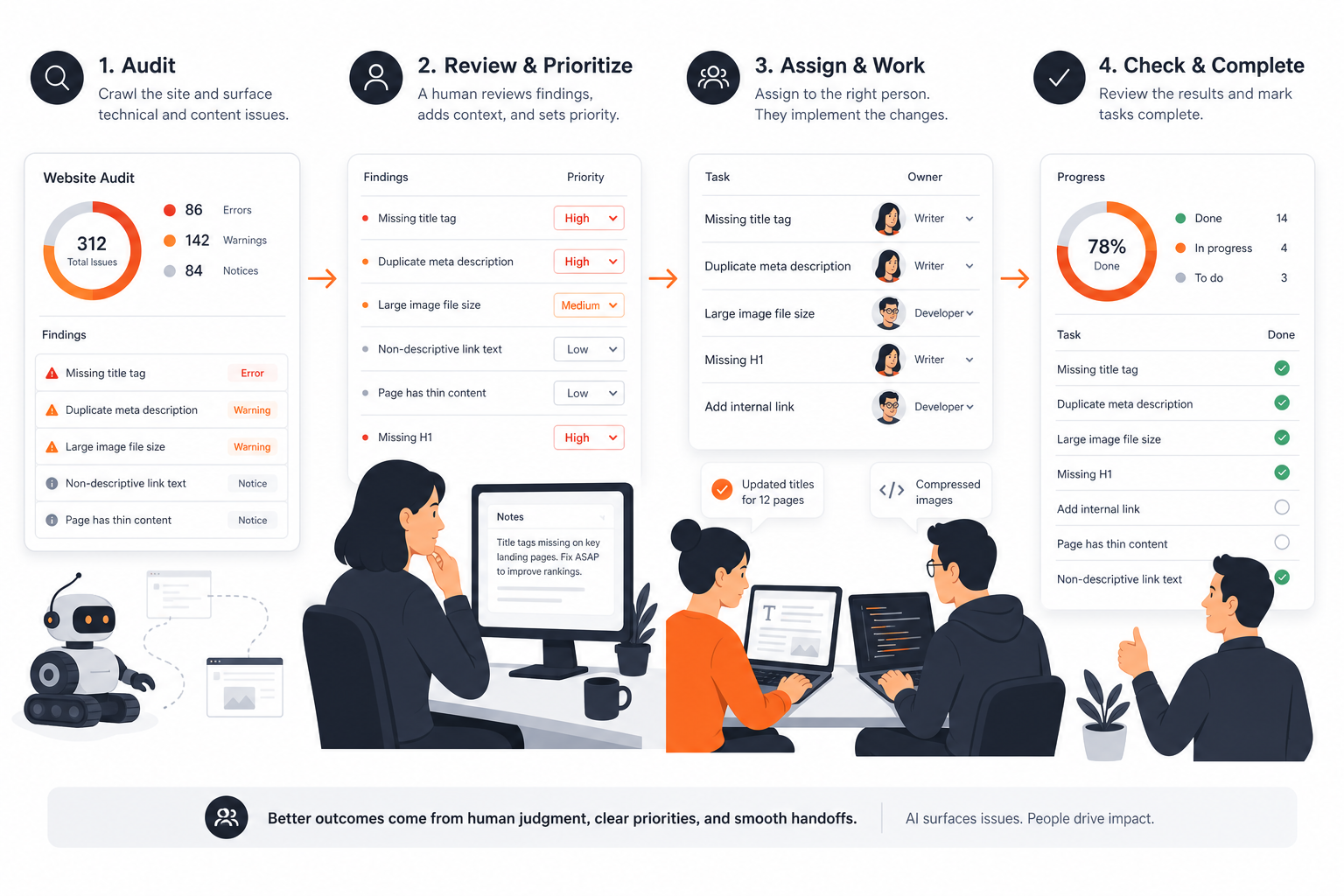 AI SEO Software Workflow
What this audience needs from the decision
Visitors evaluating what RankQuest offers need to know whether it can make SEO decisions easier to act on—not simply whether it produces another audit, score, or dashboard. The relevant question is how the software fits the team’s current way of monitoring site and search performance and deciding what to implement next.
For teams or AI agents with limited time or specialist SEO capacity, the practical constraints are clear:
- Findings must be prioritized instead of left as an undifferentiated list of issues.
- Recommendations must be understandable enough to evaluate and hand off.
- The path from identifying a problem to deciding what work to implement should require less manual interpretation.
- Ongoing monitoring should support a repeatable cadence rather than a one-time audit exercise.
This audience has less tolerance for setup that creates more work, outputs that require specialist translation, and recommendations that stop at diagnosis. A good solution should make it easier to see what changed, determine what matters next, and turn that decision into implementation-ready work. The comparison should therefore stay focused on fit for this audience—not every possible buyer, from highly specialized consultants to large organizations with extensive internal SEO operations.
The practical constraints that should shape your choice
The right SEO audit software depends less on the length of its feature list than on the constraints around your workflow. Before comparing tools, evaluate:
- Time available for review: If nobody can regularly interpret large audit exports, prioritize clear findings, ranked next steps, and implementation-ready guidance over maximum data volume. A tool that reduces interpretation burden is often more useful than one that produces more alerts.
- SEO expertise on the team: Less-specialized teams need explanations, context, and clear handoffs. Experienced specialists may value deeper technical controls and the flexibility to validate findings themselves.
- Implementation capacity: If developers, content teams, or AI agents have limited availability, assess whether the software helps distinguish urgent work from low-impact cleanup. Otherwise, the audit can create a backlog without improving the site.
- Workflow and handoffs: When several people contribute to SEO, look for outputs that make ownership, rationale, and next actions easy to communicate. Unclear recommendations increase rework between whoever finds an issue and whoever must fix it.
- Maintenance tolerance: A solution that requires frequent manual setup or repeated interpretation may be difficult to sustain. Consider how much ongoing effort is acceptable after the initial audit, not just how impressive the first report appears.
- Budget versus flexibility: A heavier, more flexible solution is worth the tradeoff when the team has specialist capacity, complex sites, or a need for detailed investigation. A simpler option may be better when the priority is consistent monitoring and prioritization without adding operational overhead.
Use this short checklist before choosing:
- Who will review findings and decide what happens next?
- Can the team turn recommendations into implementation work?
- How much technical detail can the intended users interpret?
- Will the process remain maintainable after the first audit?
- Does the tool reduce handoff and prioritization work, or add to it?
- Are you paying for flexibility the team will not use—or accepting simplicity that cannot support the workflow?
You may be overbuying if the team mainly needs a short, prioritized action list but is selecting a system that demands specialist administration. You may be underbuying if important technical decisions require repeated manual investigation that the chosen software cannot support.
Where RankQuest Fits
RankQuest is designed for teams and AI agents that need more than a list of SEO findings. If your buyer criteria include continuous website and search performance monitoring, clear prioritization, and implementation guidance, it can help turn audit evidence into the next SEO actions to fix or build.
 RankQuest homepage
Its role is an AI SEO strategist: it continuously watches website and search performance, prioritizes what to address next, and turns SEO decisions into implementation-ready work that teams or AI agents can ship. Its technical SEO audit output and tooling support the evidence-gathering stage, while AI-assisted SEO prioritization helps reduce the work of deciding which finding deserves attention first.
This makes RankQuest a sensible fit when a team is spending too much time moving from audit results to an actionable plan, or when dashboards and scores are not enough to guide implementation. It may be especially useful for teams managing ongoing site changes and for AI agents that need structured direction for SEO work. For broader evaluation criteria, see AI SEO software for faster site audits and prioritization, how small teams should evaluate site audit software, and signs your team has outgrown manual SEO audits.
The fit is practical rather than universal: RankQuest is relevant when the main job is monitoring performance, deciding what to do next, and supporting implementation. Readers can also compare SEO audit examples that turn findings into implementation-ready work or review a small-team rollout approach for AI-assisted SEO prioritization.
Related guides
- AI SEO Software for Faster Site Audits and Prioritization
- Site Audit Software: How Small Teams Should Evaluate Their Options
- Signs Your Team Has Outgrown Manual SEO Audits
- SEO Audit Examples: Turning Findings Into Implementation-Ready Work
- Rolling Out AI-Assisted SEO Prioritization in a Small Team