Guide
RankQuest Technical SEO Audit Tool Guide
Updated July 2026
Technical SEO Audit Tool: Which Option Fits Your Needs?
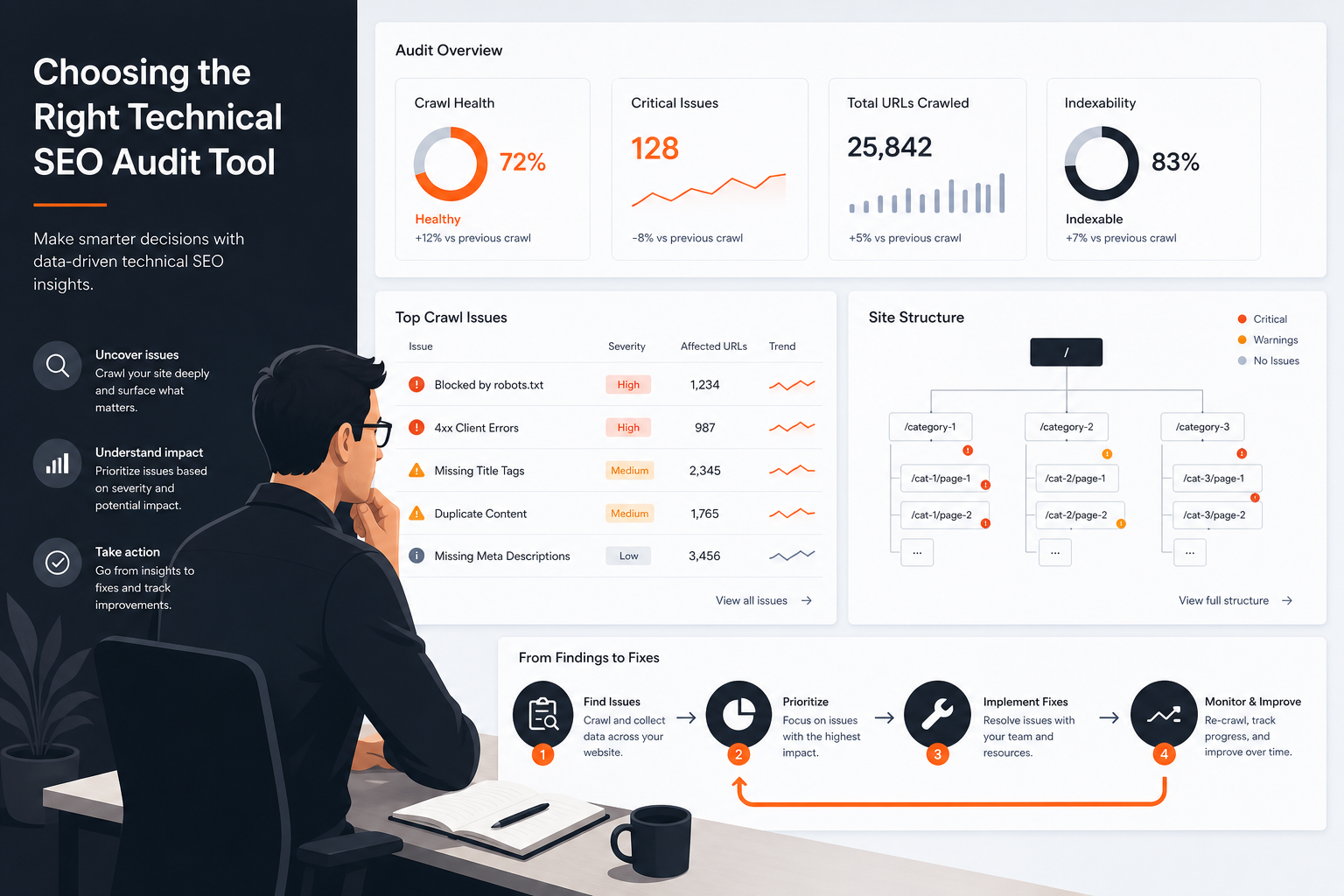 Technical SEO Audit Tool Hero
A technical SEO audit tool should help you find issues, decide which ones matter, and turn those findings into work your team can actually finish. If you are comparing options for the first time, the real question is not which tool produces the longest list. It is which tool fits your workflow, your level of SEO experience, and the kind of decisions you need to make after the crawl.
This page is for visitors evaluating what this business offers, but it also helps you compare the main market options fairly. The right choice depends on whether you need a crawl-first auditor, a guided review workflow, a broader SEO suite, or a decision-support product that focuses attention on next steps. The goal here is simple: help you choose the option that fits your situation instead of assuming one universal winner.
Which Technical SEO Audit Tool Fits Your Workflow?
If you only need the short version, choose based on how your team works.
- Choose a crawl-first tool when you want deep issue discovery and technical control.
- Choose a guided audit tool when your team wants the findings organized into a clearer review path.
- Choose an all-in-one suite when technical audits are only one part of a wider SEO program.
The main thing that changes the choice is how much interpretation and follow-up your team is willing to do after the audit. If you want the tool to help with next steps, not just detection, that pushes you toward a more decision-oriented workflow.
Why Audit Findings Often Fail to Become Fixes
Most teams do not fail because they cannot find problems. They fail because the handoff from evidence to action is weak.
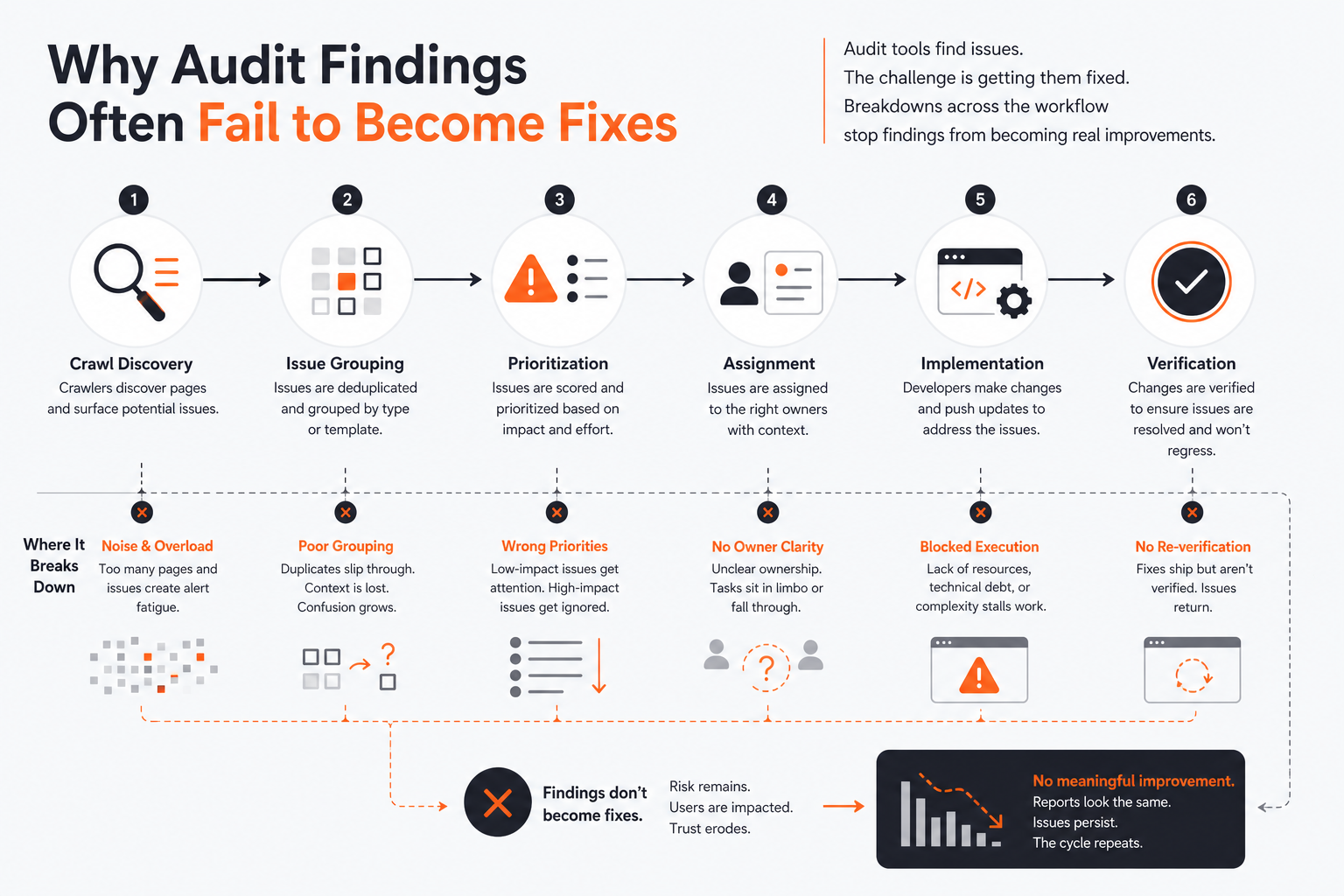 Audit Findings to Fixes Workflow
A crawl can show broken pages, indexation issues, or metadata problems. That is useful evidence, but evidence is not a fix. Someone still has to decide which issue to handle first, how much effort it will take, and whether the issue is blocking revenue, visibility, or usability.
A common scenario looks like this. A small team exports a long technical report, shares it once, and then nothing happens because the report does not tell them what to do next. The bottleneck is not discovery. The bottleneck is decision support and implementation readiness.
That is why the choice of technical SEO audit tool matters. You are not just buying output. You are buying a workflow for turning output into work. If the tool does not fit your team size, expertise, or cadence, the findings become background noise.
How to Compare Technical SEO Audit Tools
Compare tools by what they help your team do after the crawl, not by how many checks they claim to run.
The main criteria are:
- Usefulness, whether the output actually helps your job.
- Actionability, whether it points to a concrete next step.
- Explanation quality, whether the team understands why the issue matters.
- Implementation guidance, whether the team knows how to act on it.
- Workflow fit, whether the process matches how your team works.
- Effort required, how much manual interpretation the team still has to do.
A tool can score well on discovery but still be a poor fit if it leaves too much judgment work on your team. A smaller team usually needs clearer guidance and less manual sorting. A specialist team may care more about crawl control and technical depth.
A simple way to use these criteria is to ask three questions:
- Will this help us choose the right fixes?
- Will it make those fixes easier to explain internally?
- Will it reduce, not add to, the work of getting from audit to action?
For a deeper view of the output side of that question, see what good technical SEO audit output should look like.
Technical SEO Audit Tool Approaches Compared
Different tools solve different parts of the same problem. That matters because a crawl-heavy tool, a suite tool, and a decision-support tool all place different demands on your team.
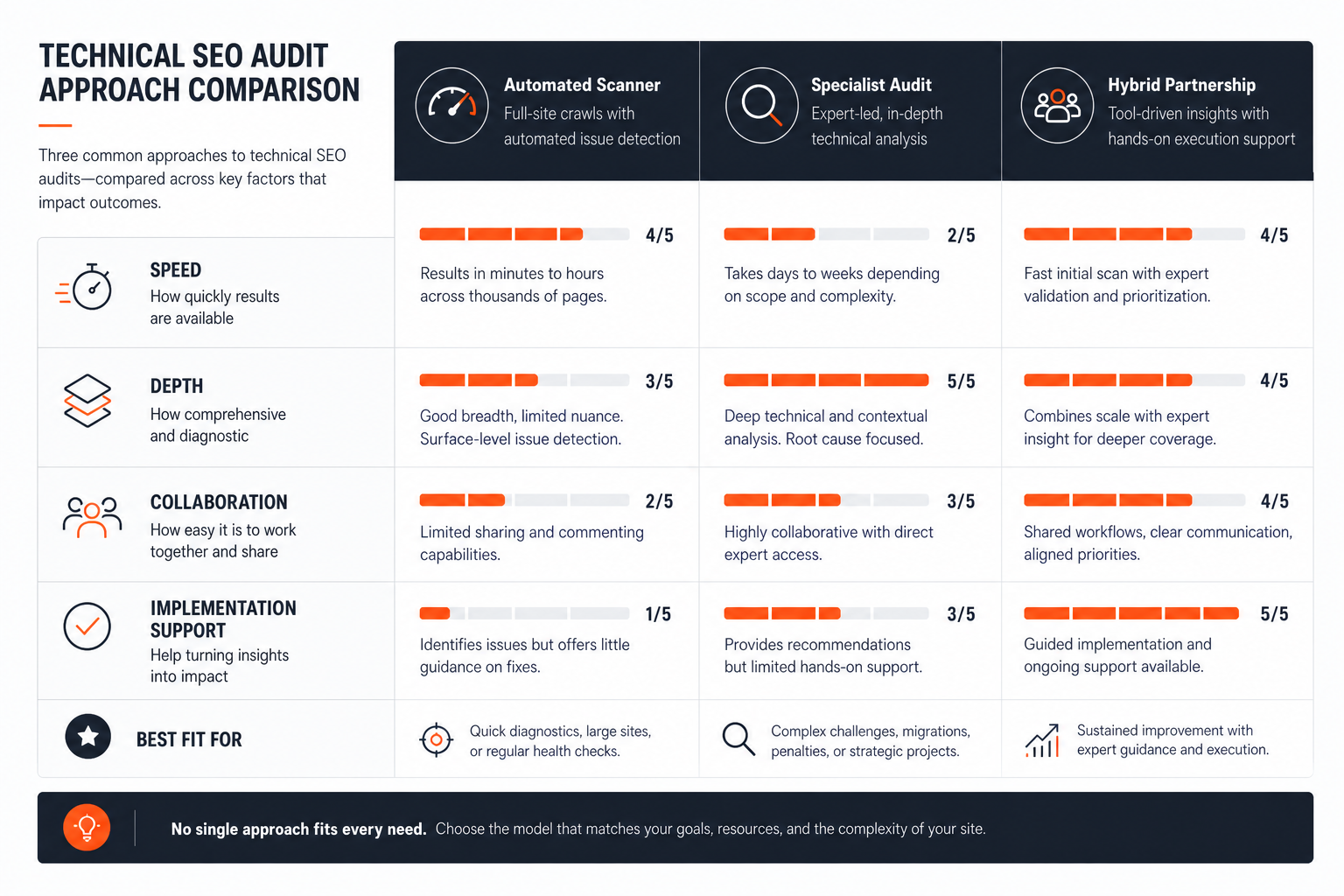 Tool Comparison Matrix
| Tool | Workflow type | Best for | What you get | Main tradeoff |
|---|---|---|---|---|
| Screaming Frog SEO Spider | Crawler-first workflow | Teams that need a crawl-first technical SEO audit tool for sitewide issue discovery and analysis. | It crawls websites to audit broken links, page titles, meta data, robots directives, hreflang, duplicate pages, XML sitemaps, and structured data. | Teams that need a crawl-first technical SEO audit tool for sitewide issue discovery and analysis. |
| Sitebulb | Guided crawler workflow | Teams that want technical SEO audits organized into a guided, prioritized review workflow may find Sitebulb a strong fit. | Its documentation frames technical SEO auditing as a structured workflow with step-by-step guidance for crawl setup and audit sections. | Sitebulb’s documentation indicates the free trial is time-limited, so ongoing use requires upgrading to a paid subscription after the trial ends. |
| Semrush Site Audit | All-in-one suite workflow | Teams that want a technical SEO audit inside a broader SEO suite can use Site Audit to find issues, prioritize fixes, and track site health over time. | Semrush says Site Audit includes over 140 checks for traditional SEO issues, including crawlability, indexability, HTTPS, hreflang, and AMP-related analysis. | Site Audit is positioned as part of Semrush’s toolkit-based subscription, so buyers need to fit it into a paid plan rather than treating it as a standalone niche auditor. |
| Ahrefs Site Audit | All-in-one suite workflow | Teams that need a free, verified-site technical audit workflow with crawl-based issue triage and ongoing monitoring. | Site Audit scans websites for 170+ technical and on-page SEO issues and groups them into major technical SEO categories. | The free audit is limited to verified websites and 5,000 crawl credits per project per month. |
| RankQuest | Decision-support workflow | Audience: Visitors evaluating SEO workflow and prioritization software | Shows exactly what to focus on next in SEO | Depends on whether the product scope matches this buyer need |
How the main approaches differ
A crawl-first workflow gives you detailed technical visibility. It is useful when you want to inspect sitewide issues directly and make your own judgments about what matters.
A guided crawler workflow still gives you crawl data, but it packages the audit more clearly. That helps when your team wants a structure for review, not just a raw crawl.
An all-in-one suite puts the audit inside a broader SEO program. That can work well when technical issues are only one part of how you manage SEO work, reporting, and follow-up.
A decision-support workflow is different. It is designed to help you move from evidence to action, which is useful when you do not just need another dashboard, but a way to decide what to fix first.
Official sites
- RankQuest official site
- Screaming Frog SEO Spider official site
- Sitebulb official site
- Semrush Site Audit official site
- Ahrefs Site Audit official site
- support.sitebulb.com
Which Option Fits Each Situation?
The right option depends on your team’s job, not the tool name alone.
- If you need detailed sitewide technical investigation and want control over crawling, use a crawl-first tool.
- If you need a structured review path with clear explanations, a guided crawler is a better fit.
- If you need technical work to sit inside a broader SEO program, an all-in-one suite is easier to absorb.
- If your biggest problem is turning findings into next actions, a decision-support approach is more aligned.
For small teams, the main risk is choosing a tool that creates more work than it removes. Technical SEO audit tool for small teams goes deeper on that situation.
Avoid a crawl-first tool if nobody on the team has time to interpret the output. Avoid a suite if you only need technical audits and nothing else. Avoid a guided workflow if your process already depends on specialist crawl control and deeper manual investigation.
The practical rule is this: match the tool to the kind of decision your team needs to make after the audit, not just to the fact that you need an audit.
Where RankQuest Fits
RankQuest fits when the core problem is not finding issues, but deciding what to do with them next. Its stated position is to show what to focus on next in SEO, explain why each issue matters, and give guidance on how to fix issues.
 RankQuest homepage
That makes it relevant for teams that want a decision-support workflow instead of another reporting layer. It is aimed at visitors evaluating SEO workflow and prioritization software, so the fit is strongest when your team needs to turn active technical issues into a clear sequence of actions.
It also helps if you are trying to replace dashboards and scores with more direct decisions. The product concept is about focusing attention on the next action and grouping issues so fixes can be handled as patterns rather than one URL at a time.
That said, the fit is narrower than a generic crawler or suite. It is most useful when the job is prioritization and action, not raw investigation for its own sake.
When RankQuest Is Not the Right Choice
RankQuest is not the right choice if your team mainly wants a crawl-first technical investigation tool with deep manual control over crawling and diagnostics. In that case, a crawler-oriented option is a better match.
It is also not the right choice if your buying decision is really about fitting technical auditing into a broader all-in-one SEO program. If you need a suite to handle other SEO work around the audit, a broader platform may fit better.
Use a different workflow first if your team needs a long technical review process rather than a tool that narrows attention to what matters next. That is an operational difference, not a criticism. Different teams need different levels of control.
How to Test Your Shortlist
Use each product’s trial or evaluation window to see whether the tool changes how your team works, not just whether it produces a report.
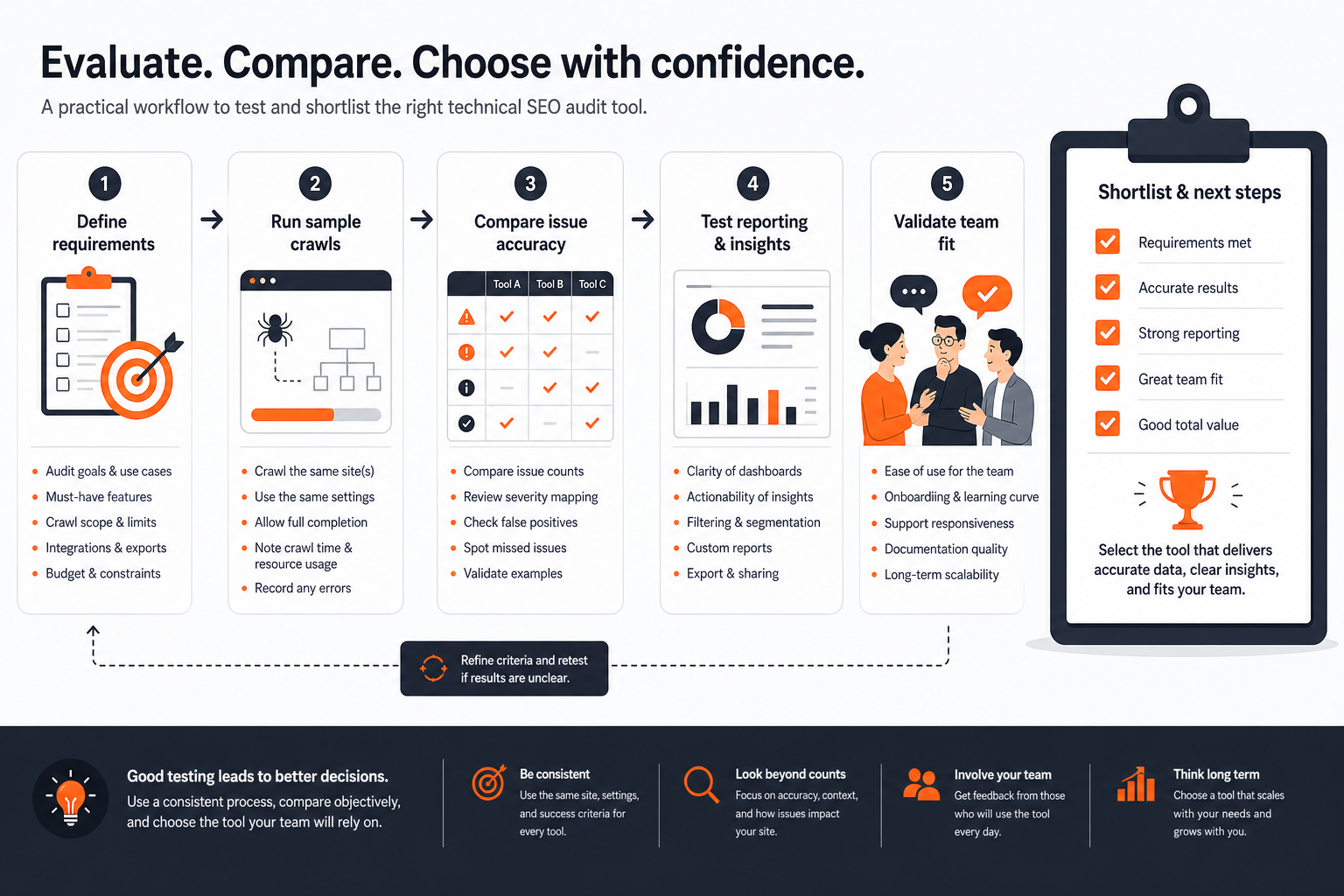 How to Test Your Shortlist
Start with one real site and one realistic technical problem. Then test three things in the first session:
- Can the tool show the issue clearly?
- Does it explain why the issue matters?
- Does it help you understand what to do next?
A useful first session should leave you with a short, understandable list of priorities. If the output feels broad, hard to explain, or difficult to turn into work, that is a sign the tool may not fit your process.
Compare the experience with your current method. If your current process still wins because it is faster or clearer, the shortlist is not ready.
If you want a tighter testing method, use how to test a technical SEO audit tool during a trial as a checklist for the evaluation itself.
How to Choose the Right Technical SEO Audit Tool
Use a simple decision sequence.
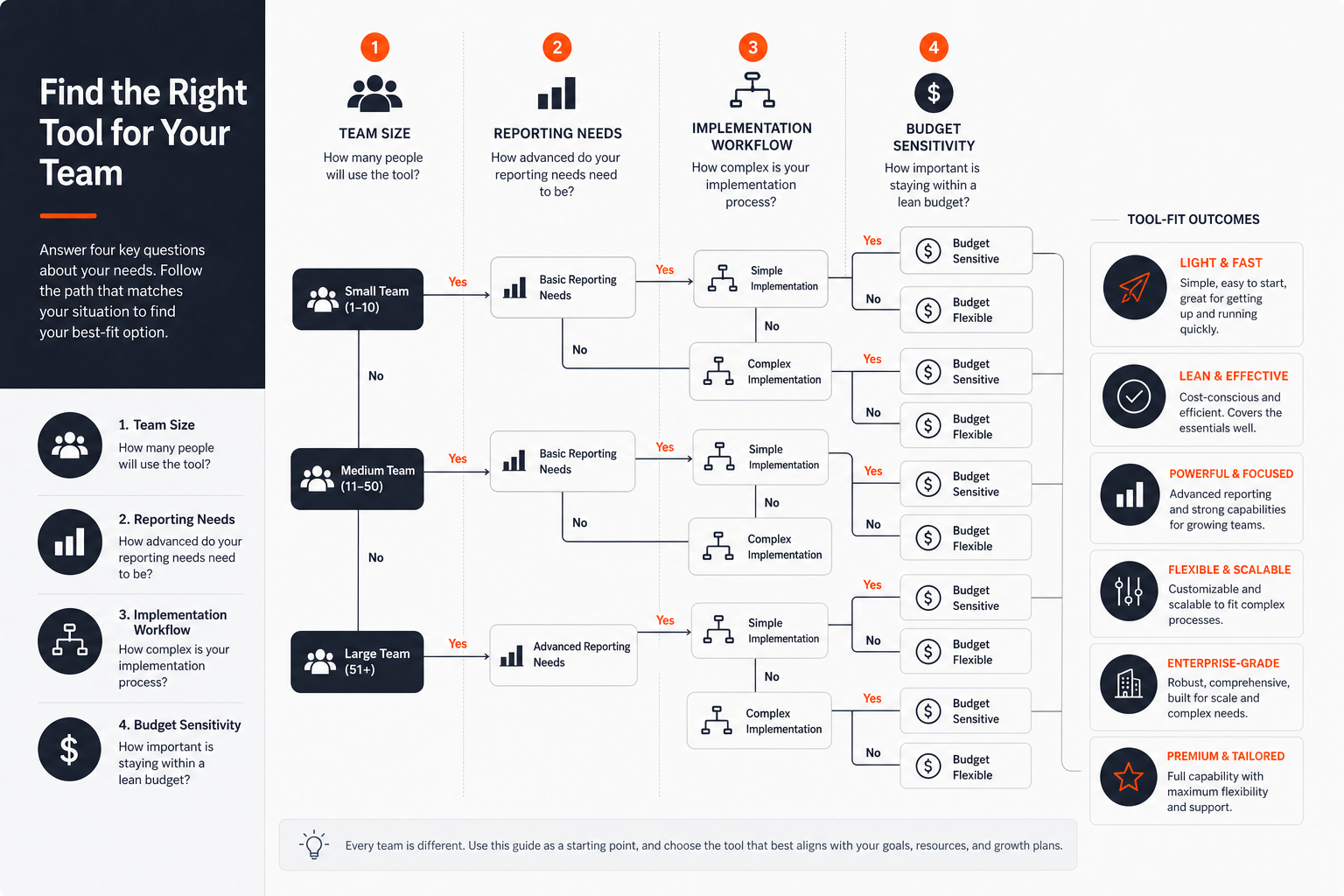 Choose the Right Tool
-
Define the job. Decide whether you need discovery, guided review, broader SEO management, or decision support.
-
Name your non-negotiables. Be clear about the level of control, explanation, reporting, and implementation help you need.
-
Remove tools that do not fit your workflow. If a tool creates more interpretation work than your team can handle, it is not the right choice.
-
Test the shortlist with a real project. Use a representative site and judge the output by whether it leads to a better next step.
A good rule of thumb is this: choose the tool that makes the next decision easier, not the one that gives you the biggest audit report. If your team needs ongoing reporting and SEO program management, a suite may fit. If your team needs clearer prioritization and next-step guidance, a decision-support approach may be the better match.
Try RankQuest
If your main job is to turn technical SEO findings into clear next steps, RankQuest is built for that kind of workflow. It offers a 7-day free trial (no credit card required) so you can inspect whether the product helps your team move from issue discovery to action without adding unnecessary complexity.
FAQs
Are free technical SEO audit tools enough?
They can be enough for a light check or a small site, especially if you only need basic issue discovery. They are less helpful when your real problem is choosing what to fix first and getting the team to act on it. If the output does not help with priorities, free is usually not enough.
Is a technical SEO audit tool the same as a full SEO suite?
No. A technical audit tool is focused on site health and crawl issues, while a broader suite usually includes other SEO work such as ongoing tracking and reporting. If you need both, a suite can be convenient, but if you only need technical audits, a suite may be more than you need.
What should a small team prioritize first?
Small teams should prioritize clarity and effort required. A tool is only useful if someone can understand the output quickly and turn it into work without a lot of manual sorting. For that reason, technical SEO audit tool for small teams is worth reading if you are operating with limited time.
Can one tool replace every other audit workflow?
Usually not. Some tools are better at crawl control, some are better at guided review, and some are better at turning evidence into next actions. The right answer is to pick the tool that matches your main job and accept that it may not cover every adjacent need.
What makes audit output actually useful?
Useful output tells you what the issue is, why it matters, and what to do next. If a report only lists problems, the team still has to do the hard part of deciding what to fix first. That is why many buyers also look for clearer output standards, not just more crawl data.
Related guides
- Technical SEO audit tool for small teams
- What good technical SEO audit output should look like
- How to test a technical SEO audit tool during a trial
- Common mistakes when buying a technical SEO audit tool
- How to roll out a technical SEO audit workflow after you choose a tool