Guide
Technical SEO Audit Output: What Good Looks Like
Updated July 2026
What good technical SEO audit output should look like
Which Technical SEO Audit Output Fits Your Workflow?
The practical question is not “does the tool find issues,” but “can my team use the output to decide what to do next?” If you need a quick answer, choose output that ranks issues by impact and gives a short path to action. If you need deeper control, choose output that also shows affected URLs, grouping, and enough detail to hand work to another person. If you mainly want a lighter review layer, choose output that keeps the list simple and avoids overwhelming you with technical depth you will not use.
 Technical SEO Audit Output Hero
The choice changes when your team’s job changes. A solo operator usually needs clarity and speed, while a larger team may need more evidence, more grouping, and clearer ownership.
How to prioritize technical issues
Technical detection and technical prioritization are not the same job.
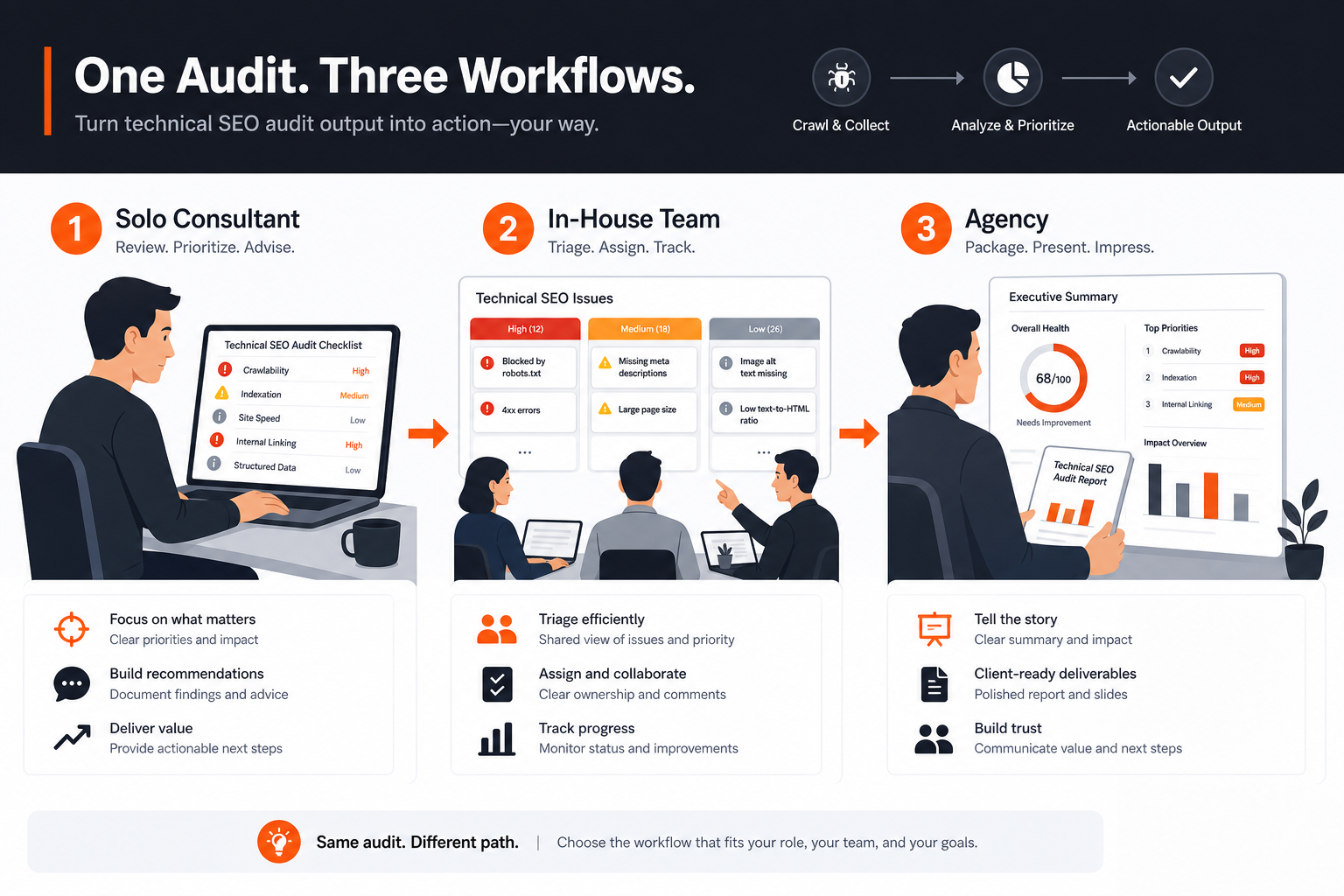 Workflow Fit Visual
A crawl can find hundreds of warnings, but that does not mean they all deserve equal attention. Good technical SEO audit output separates “interesting” from “urgent,” and it does that by helping you look at a few practical questions at the same time:
- Grouping: Are related issues bundled together, or does each URL create a new item to chase?
- Severity: Does the output make clear whether an issue is small, sitewide, or blocking?
- Impact: Can you see whether the issue affects indexability, crawlability, internal structure, or page quality?
- Effort: Does the fix look like a quick content change, a template change, or a technical task?
- Ownership: Is it obvious who can act on it, or do you need to translate it for engineering, content, or operations?
- Implementation clarity: Does the output suggest what to do next, or only tell you that something is wrong?
That is why a clean audit result is usually more valuable than a very long one. A long list can still leave you guessing.
What experienced teams do differently is focus on repeatable patterns. For example, if the same canonical or indexability issue appears across many pages, the useful output will help you treat it as one fix pattern instead of fifty separate problems. How to roll out a technical SEO audit workflow after you choose a tool goes deeper on turning those patterns into a repeatable process after the tool choice is made.
A good rule is simple: fix issues that block discovery or indexing before issues that only improve polish. Then look at problems that affect many pages before one-off cases. After that, sort by effort, because a fast fix with wide impact often belongs ahead of a slow fix with narrow reach.
Here is a simple order that usually helps:
| Fix order | What it usually means | What good output should show |
|---|---|---|
| 1 | Blocking or sitewide issues | Clear explanation of what is blocked and where |
| 2 | Problems affecting many important pages | Grouped patterns, not just URL-by-URL noise |
| 3 | Issues with clear ownership and low effort | Enough detail to assign the fix quickly |
| 4 | Lower-impact cleanup | Visible, but not treated as urgent by default |
If the tool cannot help you make those distinctions, the output is not really prioritization. It is just reporting.
When the problem needs deeper manual investigation, the better fit is usually a workflow that gives more raw detail or a specialist review process. That is especially true when the issue spans multiple templates, depends on server behavior, or needs engineering input before anyone can decide on the fix.
Where RankQuest Fits
RankQuest fits when you want audit output that pushes you toward a decision instead of leaving you with another list to inspect.
 RankQuest homepage
The verified product concept is straightforward: it shows exactly what to focus on next in SEO, explains why each issue matters, and gives guidance on how to fix it. It also replaces dashboards and scores with actionable decisions, which matters if your main problem is not access to data but turning audit findings into work your team can actually ship.
That maps well to a buyer who wants technical SEO audit output that is active, clear, and grouped by pattern rather than trapped in a screen full of metrics. If you are trying to move from evidence to action quickly, that kind of output can reduce the time spent translating the audit into a task list.
A simple way to think about the fit:
| Buyer need | What RankQuest is designed to support |
|---|---|
| Clear next step | Shows exactly what to focus on next in SEO |
| Reasoning behind the issue | Explains why each issue matters |
| Fix direction | Provides guidance on how to fix issues |
| Repeatable work | Groups canonical issues by type so fixes can be applied as patterns rather than one URL at a time |
| Active problem detection | Highlights technical SEO issues that are currently active |
That makes RankQuest a sensible choice for teams that want a decision-support workflow, especially when they care more about what to do next than about staring at dashboards. It is also a good fit when recurring technical issues need to be handled as patterns, not isolated page-level tasks.
When RankQuest Is Not the Right Choice
RankQuest is not the right choice when your main need is a crawl-first desktop auditor for broad sitewide exploration. If you want to inspect many technical dimensions directly and work through the crawl yourself, a crawler-first or suite-based tool may fit that job better.
It is also not the right choice when you need an audit experience centered on raw reporting, score tracking, or broad suite features rather than decision guidance. In those cases, the buyer is asking for a different workflow, not a better explanation.
If your team already has a dedicated technical reviewer who wants to inspect every crawl detail manually, the product scope may feel too opinionated. That is not a flaw in the audit output itself. It is a mismatch between the kind of output you want and the kind of work you need to do.
A more traditional technical audit tool can fit better when the job is:
- Deep crawl inspection and technical analysis
- Reporting for a larger SEO program
- Cross-team workflows that depend on a broader toolkit
- A use case where the team prefers to interpret the findings themselves
If you are still deciding between output styles, it can help to compare the broader tool choice first in Technical SEO Audit Tool: Which Option Fits Your Needs?. That puts the output quality in context before you commit to a workflow.
FAQs
Is a list of errors enough for technical SEO audit output?
Usually not. A plain error list tells you what exists, but it does not tell you what deserves attention first. Useful output adds priority, context, and a path to action.
Should technical SEO audit output show every affected URL?
It should show enough affected-URL detail to let you work, but not so much that the same issue feels like dozens of separate tasks. Grouping matters when the same problem repeats across templates or sections of the site.
What should a small team prioritize first?
Small teams should prioritize output that separates urgent issues from low-value noise. If a tool makes it easy to see what blocks indexing, what affects many pages, and what can be fixed quickly, that output is usually easier to use week to week.
Do scores help, or can they be a distraction?
Scores can be useful as a quick summary, but they are not a fix plan. If the score does not explain what changed, why it matters, or what to do next, it can become a distraction instead of a decision tool.
How do I test whether the output is good enough before buying?
Review whether the tool makes one issue easy to understand from start to finish: what it is, why it matters, which pages it affects, and what fix it suggests. If that path still feels vague, the output is probably too thin for a prioritization workflow. For a more structured buying check, see How to test a technical SEO audit tool during a trial.
Related guides
- Technical SEO Audit Tool: Which Option Fits Your Needs?
- Technical SEO audit tool for small teams
- How to test a technical SEO audit tool during a trial
- Common mistakes when buying a technical SEO audit tool
- How to roll out a technical SEO audit workflow after you choose a tool