Guide
Technical SEO Audit Tool for Small Teams
Updated July 2026
Technical SEO audit tool for small teams
Which Technical SEO Audit Tool for Small Team Fits Your Workflow?
If you only need a quick decision rule, start with your workflow. Choose a crawler-first tool when you want maximum crawl control and sitewide discovery. Choose a guided audit tool when you want the findings organized for review. Choose an all-in-one suite when the audit has to sit alongside other SEO work.
 Technical SEO Audit Tool for Small Teams
The choice changes most when your team has limited bandwidth. A small team usually benefits from the tool that reduces handoff burden and makes the next fix obvious, even if it does not expose every low-level setting.
One useful way to think about it:
- Use a crawler-first workflow when you want deep technical access and are comfortable interpreting the crawl yourself.
- Use a guided workflow when you want the audit output to help shape the review order.
- Use an all-in-one suite when you need audit work to live inside a broader SEO process.
If you are still deciding between broad categories, the pillar guide Technical SEO Audit Tool: Which Option Fits Your Needs? covers the larger comparison.
How to prioritize technical issues
Finding issues and prioritizing issues are different jobs. A crawler can surface errors, warnings, and opportunities, but a small team still has to decide which ones matter first. That decision should be based on grouping, severity, impact, effort, ownership, and how clear the fix is.
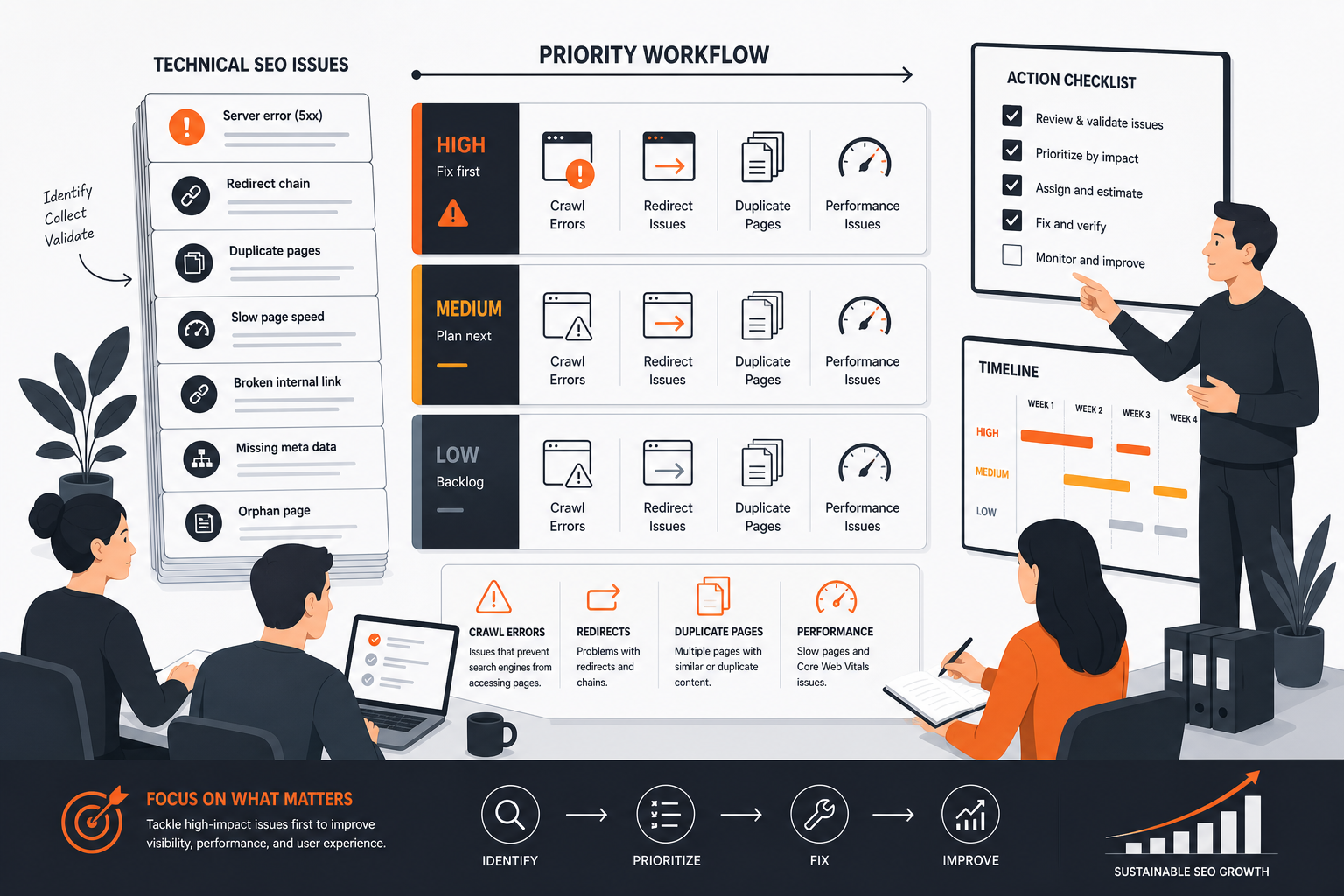 Prioritizing Technical SEO Issues
The main mistake is treating every warning like an equal priority. Small teams do better when they sort issues into a few buckets and work from the bucket that can be fixed with the least confusion and the highest likely payoff.
A simple prioritization order looks like this:
| Priority signal | What to ask | Why it matters |
|---|---|---|
| Grouping | Does this issue affect many pages or just one? | Pattern-level fixes save time. |
| Severity | Does it block crawling, indexing, or understanding? | Blocking issues usually deserve attention sooner. |
| Impact | Is the issue affecting important pages or broad sections? | Fixing key pages first often makes the work more useful. |
| Effort | Can the team fix it quickly, or does it require a larger project? | Small teams need an honest view of effort. |
| Ownership | Who actually has to make the change? | A fix is not real until someone can own it. |
| Implementation clarity | Is the next step obvious or still under investigation? | Unclear fixes slow everything down. |
This is where a good audit output matters. A useful tool does not just list problems. It helps you see which issues are active, which ones belong together, and which ones can be solved as a pattern instead of one URL at a time.
For example, if the same canonical issue affects many URLs, grouping those pages together is more useful than chasing individual reports one by one. If a redirect or robots issue is blocking discovery, that usually deserves more attention than a minor on-page technical warning.
When the issue is unclear, or when the pattern suggests a more complex root cause, deeper manual investigation is the better fit. That is the point where a small team may need a tool or process that supports more detailed analysis, or specialist help to separate real blockers from noisy alerts.
If you want a concrete picture of what useful output looks like, see What good technical SEO audit output should look like.
Where RankQuest Fits
RankQuest fits when you want a decision-support workflow instead of another dashboard. Its verified positioning is about showing exactly what to focus on next in SEO, explaining why each issue matters, and providing guidance on how to fix issues. It also replaces dashboards and scores with actionable decisions.
 RankQuest homepage
For a small team, that matters because the real bottleneck is usually not finding more issues. It is turning a long list of findings into a short list of decisions the team can trust and execute.
| Buyer need | Verified RankQuest capability | Practical benefit |
|---|---|---|
| Know what to do next | Shows exactly what to focus on next in SEO | Reduces guesswork about the next fix |
| Understand why an issue matters | Explains why each issue matters | Helps a small team judge urgency |
| Move from issue to action | Provides guidance on how to fix issues | Makes the next step easier to hand off |
| Reduce noise | Replaces dashboards and scores with actionable decisions | Keeps the workflow centered on action, not reporting |
| Work on recurring patterns | Groups canonical issues by type so fixes can be applied as patterns rather than one URL at a time | Helps teams avoid repetitive one-off work |
| Separate current problems from stale ones | Highlights technical SEO issues that are currently active | Focuses attention on issues that still need work |
That makes RankQuest a sensible fit for visitors evaluating SEO workflow and prioritization software who want a clearer operating model, not another place to monitor numbers. It is especially relevant when the team needs to make one SEO decision at a time and wants the tool to support that habit.
If you want to compare workflow choices before committing, the trial and rollout guides can help you sanity-check the fit: How to test a technical SEO audit tool during a trial and How to roll out a technical SEO audit workflow after you choose a tool.
When RankQuest Is Not the Right Choice
RankQuest is not the right choice if your team needs a crawl-first technical SEO audit tool for deep, low-level inspection of sitewide issues. Some buyers need advanced crawl controls, desktop crawler behavior, or a more hands-on technical investigation workflow than a decision-support product is meant to provide.
It is also not the right fit if your process depends on a broader SEO suite where technical audits sit next to other modules in the same subscription. In that situation, the better choice may be a suite-based workflow rather than a focused decision layer.
Finally, if your team’s main need is raw investigation rather than guided prioritization, a product that centers crawl analysis and manual interpretation may fit better. That is a different job from “tell us what to fix next.”
FAQs
Is a simpler tool enough for a small team?
Yes, if the team mainly needs a short list of priorities and a clear next step. A simpler workflow is often enough when the main problem is decision fatigue, not lack of data. If the team regularly needs advanced crawl control or deep technical investigation, a more specialized tool may be a better fit.
Do I need a tool that gives a score?
Not necessarily. A score can help some teams track overall health, but it can also hide the real question, which is what to fix first. A small team often benefits more from clear issue grouping, explanation, and fix guidance than from a single summary number.
When should I choose a broader SEO suite instead of a dedicated audit tool?
Choose a broader suite when the audit needs to live inside a larger SEO workflow and your team already uses that platform for other work. That can make sense when you want technical audits, tracking, and other SEO tasks in one place. If your main need is prioritizing fixes, a more focused workflow may be easier to manage.
What should I look for in audit output before I buy?
Look for output that groups issues sensibly, shows why they matter, and makes the next action obvious. Useful output should help you decide whether something is a pattern, a blocker, or a lower-priority item. If you want more detail on that, read What good technical SEO audit output should look like.
How should a small team test fit before choosing?
Test the tool on a real site and check whether the output helps the team decide, not just inspect. Pay attention to how quickly you can understand the findings, whether the issue grouping makes sense, and whether the next action is clear without extra translation. A trial is most useful when you judge workflow fit, not just feature lists.
Related guides
- Technical SEO Audit Tool: Which Option Fits Your Needs?
- What good technical SEO audit output should look like
- How to test a technical SEO audit tool during a trial
- Common mistakes when buying a technical SEO audit tool
- How to roll out a technical SEO audit workflow after you choose a tool